No matter in which industry your work, the use of IT services is a vital part of your everyday life and business success. You need a secure cloud environment for your applications, a Test/Dev environment for your developers, and security solutions to ensure your data and workloads are protected. Your website needs an SSL certificate, reliable backups, DDoS protection. In addition, you may need specialized services like SD-WAN, Firewalls, and 24/7 monitoring of the reliability of your applications. The list of the needed IT services does not end here. Especially if you are managing remote teams. For many companies, it is close to impossible to have an internal team with such wide expertise. Moreover, having a team specialized in all these solutions internally requires a huge budget for recruiting and salaries.
For all the above-mentioned points and also for financial reasons, working with an external IT provider is a preferred option for many companies. The collaboration with a skilful managed service provider allows companies to get the needed IT solutions and expertise at the moment they need them. Moreover, hiring an IT service provider is financially better for the company. You have also access to the latest innovations and technology solutions, without the need to support an internal R&D team. Another benefit is that you can save costs from licensing. But how to be sure you are making the right choice of IT service provider?
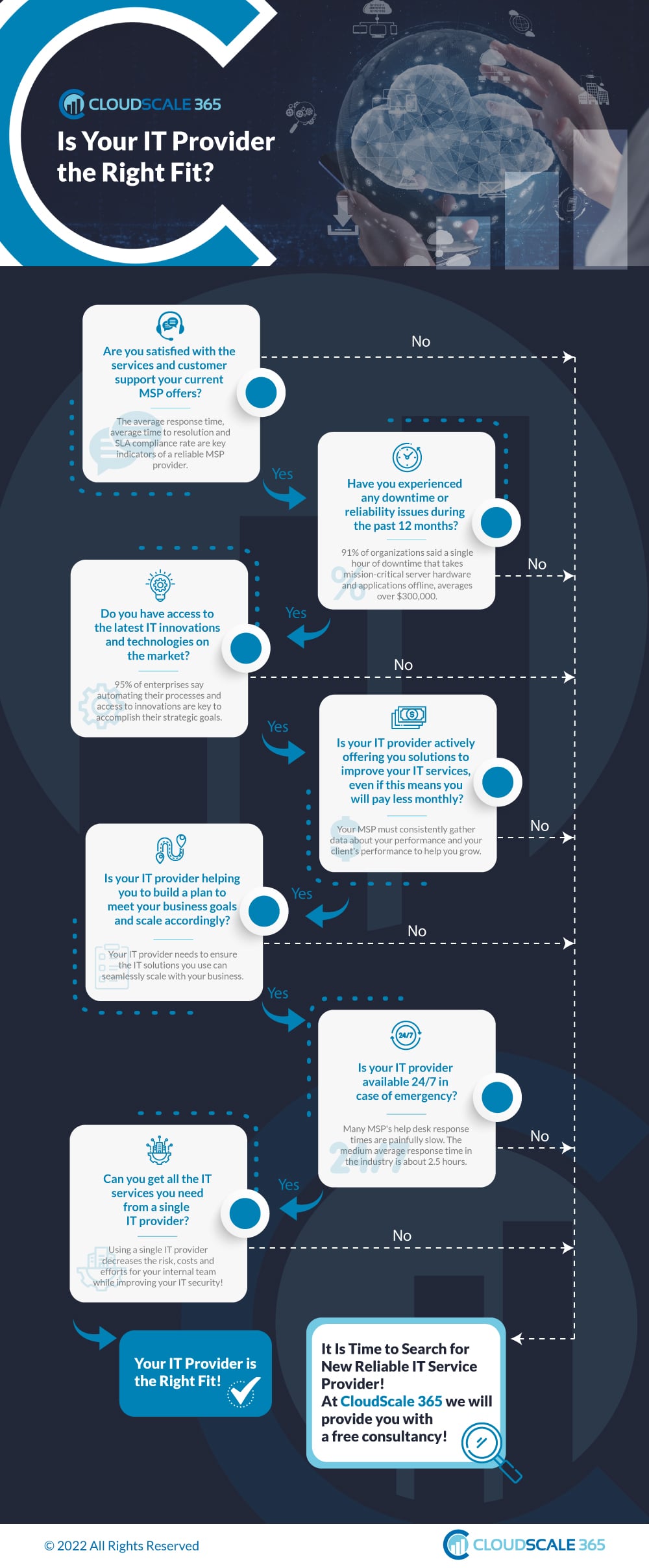
The CloudScale 365 Team has prepared a short infographic, which can help you find out if your IT Service Provider is the right fit for your needs!
Key Factors to Choose and IT Service Provider
SLA and Customer Support
The average response time, average time-to-resolution and overall SLA are key factors to consider when choosing an IT service provider. The SLA is clearly defining the obligations and responsibilities of the MSP with which you will work. It provides protection for both sides and is a document to refer to in case of any disputes. We recommend you review it carefully before choosing your IT partner. In addition to it, most of the MSPs support internal statistics for the average response time in case of tickets submitted. And you may ask to take a look at it before signing a contract.
Downtime and Reliability
As a business, you need to ensure that your workloads are safe and secure and always accessible. The keyword here is reliability – can your IT service provider ensure maximum uptime for your cloud and applications, which also includes maintenance and upgrades, which are not causing any downtime? If you notice that your MSP is regularly having reliability issues or problems during upgrades, we recommend you search for another option.
Access to Top-notch Technology
An experienced IT Service Provider needs to always research the latest technologies and implement innovations. This is extremely important in terms of the security and provisioning of managed services. As a company, implementing the latest innovations will help you to implement smart automations and ensure higher efficiency and reliability of your applications, thus better end-user satisfaction.
A Thought for the Future
Your IT Service Provider is also your long-term partner. They are not just a provider of a service, but also need to help you grow, building a long-term roadmap, disaster recovery solutions, business continuity and reliability plan. A good MSP will also offer you new and better solutions, no matter if this will lead to you paying lower monthly fees.
Emergency Scenarios
The one and only thing with which you need to make no compromise is how your IT service provider behaves in case of emergency. 91% of organizations say that a single hour of downtime averages to $300 000 loss. Every second downtime causes financial loss, loss of trust and market share. And the worst scenario is losing customers’ data. So you need to be sure that your IT service provider is 24/7/365 available in case of emergency and you can rely on it to resolve even the toughest problems.
At CloudScale 365 we are proud to say that we are always together with our customers – helping them scale and meet their targets. We put the Ops in DevOps! When top-tier infrastructure combines with experience and ingenious engineering power, the magic happens.
Website’s Security Vitals: Keep your site up to date and avoid being HACKED
Website maintenance begins immediately upon its creation. A vital part of its maintenance is ensuring that your website is secure. For a website to perform well, attract visitors and rank well in search engines, you need to take care of it regularly and ensure it is not hacked, which will usually cause a Google penalty and drastic rank lowering. If the website is CMS-based and is rich in content and functionalities, its maintenance becomes even more severe.
Ensuring Performance and Security for Your Website
Part of the things you need to keep in mind to guarantee your website’s security and performance are:
Regular website backups – you can use the built-in hosting capabilities or take advantage of managed backup services by your hosting provider and ensure you have your website and data secure.
Dev/Staging environment – we recommend you create a copy of your website in a staging environment. This will help you test updates, upgrades, new features, and ideas on it and not on the live website version. Thus minimizing website downtime and chances of being hacked due to using an unsecured plugin for example.
Regular updates on the website and the plugins you use – extremely important for CMS systems like WordPress is to stick to the latest up-to-date version of the CMS. And of course – do not forget to check if your plugins are also up-to-date. Our recommendation is to test all updates on the staging environment and then replicate them live.
Ensuring good page load time – Fast loading on desktop and mobile devices affects the user experience and search engine ranking. Therefore, the more optimized and faster your website is, the better the user experience and the positions in search results.
The Importance of Regular Updates
The lack of updates to CMS like WordPress can and will affect your site, making it easier for security breaches to occur, hence, the loss of business, money, time and damage to your reputation will become a fact. This is a risk you should not take in the age of technology.
Why should you keep your site up to date?
SECURITY PATCHES are applied to resolve vulnerabilities that hackers can exploit.
Corrects errors and bugs found in previous versions.
Performance Improvements.
New features and added security.
Avoid compatibility issues with newer versions of PHP or WordPress.
The Consequences of Having Your Website Hacked
Being hacked can lead to different situations and scenarios. A few examples of malicious actions and consequences of your website being hacked are:
Phishing – Malicious pages are added to your site and mimic another site. A malicious page is a copy of a page from a legitimate site. The page usually has a login form in which your customers enter their login details without suspecting that it is a fraudulent page.
Website Defacing – Changing the appearance of your website, including images and content usually on the home page.
Malicious Redirects – Redirect visitors to malicious and phishing sites. Usually causes a significant dropdown of your website’s Google Rank.
Blacklisting – These are lists that record hacked sites. The lists are public, and browsers can access them, thus alerting site visitors of potential danger. Also affects your domain reputation and email functionality.
Data breach – data breach exposes confidential, sensitive, or protected information to an unauthorized person. It causes a significant loss of customer trust and leads to financial loss.
… and many more.
Building a Website Maintenance Plan
CloudScale365 advises working with your developers on a maintenance plan to ensure your WordPress is kept up to date and functional. Here are some tips on how to accomplish this:
Create a development copy of your site where developers can perform the updates and play around to ensure website functionality or correct any compatibility issue caused by the update.
As we mentioned above, you can have a staging environment where Developers can push their work for User Acceptance Testing (UAT)
Have a team that can test the up-to-date website. Your company users that constantly work on your site would be the best ones to detect any problem caused by the updates, don’t rely only on the testing performed by Developers.
Before pushing changes to production, always take a backup of your site, so in case it is necessary to roll back, you can quickly restore to a working version of your site.
Have a workflow to push changes to your production site and perform a new QA against it to ensure all is properly working. Developers can look at different options for versioning to make this a seamless process.
If you currently don’t have developers, here are some of our recommendations:
BackOffice Thinking was founded in 2006 and has helped hundreds of nonprofits increase their impact by making better use of technology. Among other services, we design websites, develop custom integrations, conduct strategic assessments, and provide crucial ongoing support. Our Proactive Support plan allows you and your team to stay focused on your mission while we keep your systems safe, applying regular patches and upgrades as needed, along with monitoring product and service notifications to determine potential impacts. You can rest easy knowing your site is performing well and that you’ve minimized your exposure to hacks and other security threats.
Get in touch with them at (610) 709-6570 or sales@backofficethinking.com
Wheelhouse Creative is a web design and development agency delivering custom solutions for both large and small businesses looking to grow sales and brand awareness. Our experience working in a wide array of industries has allowed us to craft a refined approach that helps your business deliver on its full potential: On time. On budget. On point.
Get in touch with them at (207) 712-4483 or kevin@wheelhousemaine.com
Achieving the Ultimate Level of Online Security – CloudScale365 Security Overview and Customer’s Responsibility
“An IT system is as secure as its weakest component.”
We all know that ensuring the security of our IT infrastructure is critical for end-user satisfaction, smooth applications and business success. But are we aware of what we can rely on from our IT service provider and what actions we should take on our side?
Security is a joint effort between customers, developers, sysadmins, and service providers (infrastructure, network, etc). No matter how experienced in IT security your infrastructure provider is, there are certain actions each business should take on its own to ensure it is secure. You might be using the best technology on top of your servers or application, but if there is a vulnerability within the application, there is no technology that would be able to protect it. Achieving the ultimate level of online security can be done only by combining the knowledge and expertise of a managed IT services provider and your own responsibility.
In this article CloudScale 365 security experts are providing an overview of how we ensure your security together with a practical guide on what actions you need to take on your own to protect your applications and workloads online.
As a managed service provider, we ensure a secure environment covered by different layers including but not limited to Physical Security, Network Security and Personnel Security. Here you will find a description of each of the security components and their scope. In addition, we believe that our customer’s responsibility and proactiveness is also vital factor in achieving the ultimate layer of security.
According to a recent Gartner report, through 2025, a full 99% of all cloud security failures will result from user error. The good news is that these issues can be prevented in virtually all cases when the IT infrastructure users understand their roles and responsibilities in cloud security.
While CloudScale 365 cares for the infrastructure and its maintenance in operational conditions, our customers are entirely responsible for the way their applications are built, updated and maintained. In certain specific cases, we are happy to support our customers in their efforts to ensure their online security, by providing our Ops as a Service solution. Under all circumstances, you are responsible for properly configuring and using the services we provide and taking your own steps to maintain appropriate security, protection, backup, etc.
Customer Responsibility
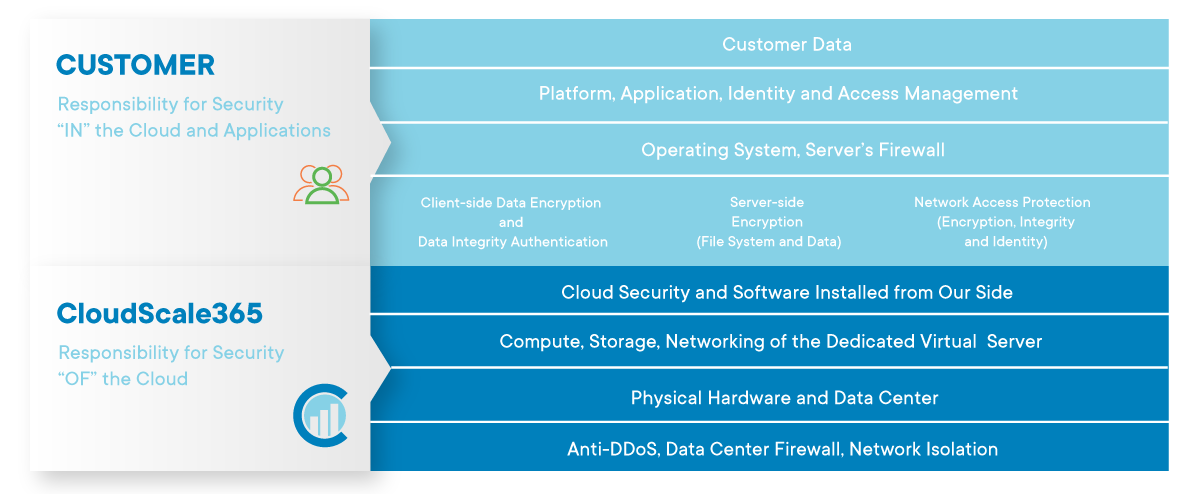
As a service provider, we are responsible for the security of the cloud, while as a customer you are responsible for security in the cloud. Our customers are responsible for securing their servers, users, services, and applications such as SSH, SFTP, FTP, SMTP, HTTP, HTTPS, Java, etc. We put our best efforts to provide the highest level of security for our data centers and networking, but all security within the server is customer’s responsibility. Servers come with a default set of rules and fail2ban pre-installed, however, customers need to configure the tools according to their needs to ensure they are protected. CloudScale365 cannot take responsibility for unsecured services running on customers’ servers.
CloudScale 365 Shared Responsibility Model Overview
All Levels on Which CloudScale365 Hosting Division Ensures Your Security
DATA CENTER RESOURCES
Your Data Center resources are provided and hosted by Quality Technology Services. This is one of the largest data center operators in the USA. QTS complies with the highest standards of operation. All QTS data centers are SOC1 and SOC2 certified. QTS has designed a comprehensive security program that unifies physical and cyber security under a centralized security umbrella to achieve a more holistic view of the risk landscape. We can provide QTS compliance reports for industry standards.
PHYSICAL SECURITY
We currently lease space and facilities in the Suwanee, GA and Richmond, VA data centers. Only a few designated personnel within our organization have site access. They must have a photo ID entry key which provides access to the facility lobby only. They must then check in with a 24/7 manned security desk to have their entry key activated for data center floor access. There are multiple separate biometric access control activated doors (two fingerprint stations and one retina station) to pass onto the data center floor. The physically separate doors are monitored with surveillance cameras by security personnel and are designed to prevent tailgating. Our operation is housed in a locked cage on the data center floor. Our personnel must check in at the floor operations office inside the data center to obtain a key to our cage. The floor operations office has real-time access to their security system telling them who is on the floor and where they are at all times. Keys must be checked out and checked in each time the cage needs to be entered. When our personnel exit the facility their entry key is then deactivated for data center floor access. Here is a link to their site that provides a lot of information and a virtual tour of the data center.
More information about the data center physical security and the unique converged security approach of QTS you can find here: http://www.qualitytech.com
NETWORK SECURITY
While there is no network immune from attacks, a stable and efficient network security system is essential to protect data and ensure business continuity. At CloudScale365 we employ a number of mechanisms to guarantee network security.
1. Fortinet Firewall – In our QTS data centers we have an industrial-strength Fortinet firewall that has rules set up to restrict access to certain ports as well as to detect and stop denial of service attacks. Fortinet is a major network equipment and services provider, landing high in the Gardner magic quadrant.
2. VPN – all of our internal and administrative systems can only be accessed through a Virtual Private Network (VPN) that is for the exclusive use of our employees. The access list is controlled by our LDAP-based directory service which allows us to immediately restrict access in the event that a person’s employment with eApps is terminated. Our staff must have a personal security certificate to access devices on the network. Also, we provide private VPN services for customers as an option. Our Private Cloud service includes a VPN gateway for administrative and back-end server access.
3. Password Control – All internal systems have a rigid password management process that ensures that passwords are secure and revised periodically. Also, our hosting management system requires that all customer-created passwords pass a cracklib test. This helps us enforce the usage of secure passwords. We also have a password scanner utility that we use on an as-needed basis when we suspect that a customer has a weak password.
4. 24/7/365 Monitoring – we use a sophisticated monitoring system that alerts us for not only outages but unusual levels of resource usage, with particular sensitivity to data transfer rates. This allows us to act quickly if our bandwidth usage spikes. Our data center operator also has a monitoring set up to detect unusual activity on our Internet circuit as well as power and temperature monitoring variances. We also provide resource monitoring and uptime monitoring for all customers at no additional charge.
5. Intrusion Detection/Prevention System (IDS) – Our firewall has a built-in intrusion detection system that alerts us and deactivates access protocols (such as SSH and FTP) whenever numerous attempts are being made to attempt to compromise an access protocol. The IDS also provides reports of abnormal activity.
6. Vulnerability and Malware Scanning – we perform various scans to identify vulnerabilities and malware that find their way onto our customer’s systems. We also provide malware scanning services to customers as an option.
7. Exploit/Vulnerability Response Process – we have an aggressive response policy regarding the identification of known exploits. We take appropriate action as soon as we determine that one of our customers has an exploit. In the case where a major exploit is reported to be in the wild, we form a response team. This team determines the impact within our network, assesses the risk, and implements an action plan to mitigate the risk. Our company received many compliments from customers for the way our response team handled the 2014 Heartbleed vulnerability.
8. DDoS Protection – CloudScale 365 employs multiple systems and processes to protect against both Inbound and Outbound DDoS attacks. These include automated Inbound DDoS protection systems provided by our Data Center providers. The inbound DDoS protection system is from Arbor Networks, a major vendor of DDoS protection systems.
We also have an option for enhanced DDoS/WAF protection through our partner StackPath. The use of this service is included free of charge for all eApps customers. This optional service works the same as CloudFlare’s $20 per month PRO plan and requires that the server is configured to hide (cloak) the assigned IP address, to prevent direct attacks against the IP.
SALES SECURITY
We have an extremely thorough order verification process for new customers. Since we implemented our order verification process in June of 2004 it is very rare for anyone to purchase our service using a stolen credit card. This effectively eliminates the possibility of a hacker posing as a legitimate customer to gain access to our services.
PERSONNEL SECURITY
We have a rigorous screening process for new hires. This includes extensive interviews and 5 types of background checks. New staff are trained on security policies and procedures as part of the onboarding process. Staff must sign a security and privacy agreement prior to beginning work.
We control access to our internal systems using a Virtual Private Network (VPN), LDAP-controlled access lists, and individual security keys instead of passwords on our servers. These tools allow us to block access by a former employee immediately in the event of they leaving the company, which is much faster than manually changing passwords on each server.
PRIVACY POLICY
We have a very strict privacy policy for all customers. We are GDPR compliant and adhere to the strict rules on privacy required by the European Union. We are also certified under the US Department of Commerce’s Privacy Shield program, which protects all EU citizens, and the corresponding program for Swiss citizens. We apply these policies to all customers worldwide. Here is a link to our Privacy Statement.
Most of our customers pay for their service using a credit card. Our payment processing systems use a credit card “vault” concept. What this means is that credit cards used by customers to pay for their eApps services are stored at the payment processor location and are processed using a token. This approach is recognized by the PCI compliance process as having a very high level of security. For our customers that process credit cards, we offer PCI compliance assistance services to help them achieve PCI compliance on their eApps servers.
CUSTOMER PCI COMPLIANCE
The CloudScale 365 hosting service is PCI-ready. However, PCI compliance is a shared responsibility between us and our customers.
1. Each customer’s application is unique and can have inherent PCI issues over which we have no control.
2. Customers have a responsibility to update their operating system components or migrate to a newer operating system when needed. We apply patches for severe, publicly known vulnerabilities but we do not update the various components automatically because this will often break a customer’s site or web application. We provide services for upgrades and migrations upon request for a billable fee.
3. There is no universal definition of PCI compliance. Various scanning services are used to certify PCI compliance and their exception reports are not uniform. We provide assistance as a billable service to interpret scanning reports, perform updates as needed, and interact with the PCI scanning service. PCI compliance assistance services are available on a billable as request basis and on a quarterly fixed fee basis.
As a managed service provider, we are constantly investing in innovative solutions to strengthen your security and ensure IT infrastructure sustainability. But we also believe in the shared responsibility model, where customers must also be part of the process. By understanding the shared responsibility model, we can ensure the security of your cloud infrastructure and improve your overall security posture.
How Managed Services Can Help Your IT Staff Avoid Burnout
COVID-19 pandemic made the whole world work remotely and almost every business had to become virtual so it could be accessible from every part of the Earth. Although remote work has many advantages for both – employers and employees, there are also many unprecedented situations for the companies.
IT departments in all organisations had to make the transfer from physical to virtual work smooth for the companies, employers and management. Besides the responsibility for the daily operations, IT teams now had to equip their colleagues with the stuff needed to work away from the office.
You might be surprised to know that the legal industry was one of the first to look towards digital transformation in the past. The large volume of paperwork and information made governments and legal businesses become one of the first adopters of software for electronic processing of documents, case management systems, etc. more than 10 years ago. Ironically, today legal companies are the ones who lag behind many other organizations in terms of digitization, flexibility, and security. If they want to remain sustainable, however, they need to take more active steps and digitalize at a faster pace.
Is your NGO up-to-date with the latest trends in the digital space? Did you know that taking on a digital transformation journey can help you bring trust, engage your stakeholders and support your mission better than ever before?
At a time when most people and organizations could communicate only online, NGOs need to stay in touch, to help, and to keep raising funding. It is not a surprise that only those who accept the need for digitalization manage to remain stable and maintain operations.
Now more than ever, there is a greater need for eCommerce scalability in today’s digital world due to ever-changing customer demands.
According to Google, the chance of a bounce increases by 32% when a page load time goes from one to three seconds, and by 90% when the page load time goes from one to five seconds.
This underlines just how essential the customer experience is to online retail. If your online business experiences a sudden increase in demand and your online infrastructure cannot handle it, you will lose money.
Every step your business takes toward eCommerce growth should put the customer experience first, which is why scalability is so critical to your long-term success.
And in the following lines, we’re going to take a look at what exactly scalability is and why it is so important.
Scalability in cloud computing refers to increasing or decreasing IT resources as needed to meet changing demand. The cloud’s scalability is one of its strongest features and a key reason for its popularity with businesses.
Today’s cloud computing infrastructures allow users to scale data storage capacity, processing power, and networking. But the best part is that scaling can be done quickly and easily, typically with little to no downtime. Nowadays, all Managed Service Providers have the infrastructure already in place. In comparison, years ago, when scaling was related to on-premises physical infrastructure, the process could take weeks or months and cost a ton.
Now that you understand what scalability is, let’s move on to why it’s so important for your eCommerce business.
Scalability allows you to get the most out of every situation
Growth – that’s the goal all eCommerce businesses share. Nobody starts an online business with a plan to break even year-over-year. It’s a game of profit. And to achieve it, you have to take advantage of environmental factors that work in your favor, as well as prepare yourself for external events that may surprise you.
Back in 2018, Amazon launched “Prime Day” to engage its 100 million Prime members with targeted deals and massive discounts. However, Amazon’s website couldn’t handle the massive surge in traffic, and just a few minutes into the sale, they ran into a major problem. This left all Prime members unable to checkout with their purchases, simply redirecting them to the homepage. On that day, this unexpected issue cost Amazon more than $1 million per minute. It was an expensive lesson in scalability, and it’s something every business, regardless of its size, can learn from.
The situation faced by Amazon was largely self-inflicted, but there are many other factors (such as pandemics) that can cause consumer behavior to be unpredictable. This behavior change may or may not be suitable for your retail business, depending on how well you are prepared. In other words, could you easily scale your hosting resources?
A scalable hosting solution will allow you to grow
Scalability is about making sure that as you increase your capacity to deal with a surge in web traffic and order fulfilment, you don’t lose sight of what made your brand successful in the first place.
That means putting scalability in your plans way before it even needs to occur. You want to know that in one, five, or ten years from now, you’ll be able to fill twice, three times, or ten times as many orders as you currently do, without facing any problems.
You need to avoid downtime, preserve the customer experience, and ensure deliveries go out on time at all costs. Because just a single slip-up in any of these areas can cause prospects to leave your website and go to one of your competitors that likely popped up in the same Google search that led them to you.
The best part is that today’s online businesses don’t have to worry about finding scalable hosting solutions. There are a ton of options out there that can do the work. But if you want to gain a competitive advantage, relying on a solution that “can do the work” is not good enough. You have to find a partner you can trust, a partner with solid experience in providing cloud and hosting solutions for the eCommerce industry.
CloudScale365 – The Trusted Cloud Partner
CloudScale365’s cloud solutions run on high-performance infrastructure, powered by innovation, and designed to accelerate your eCommerce business.
We can deploy for you a custom-fit virtual cloud server within minutes and you can scale its resources independently at any time. In other words, regardless of the traffic to your website, you can be sure that at any given time, you will have enough hosting resources at your disposal.
Furthermore, with CloudScale365, you’ll have a trusted partner handling your infrastructure on your behalf. We know how stressful running a successful online business can be, and adding yet another task to your plate can make matters worse.
Therefore, our team of Cloud Engineers is here to architect, deploy, and support the ultimate solution for your project’s success. We’ll take care of your infrastructure’s performance, security, and availability, you can focus 100% on further developing your business.
So don’t waste time wondering if a cloud solution will suit your needs. Instead, contact us and enjoy predictable billing, security, professional support, and most importantly – scalability, for your eCommerce business.
Protecting Your Data With Offsite Backups
All of our data is lost.
This is every organization’s worst nightmare.
You might have dedicated servers and a dedicated tech team to take care of your infrastructure. Yet, malfunctions happen. It could be malware, ransomware, or even a natural disaster. Whatever it is, the main point is that today’s companies can’t afford to lose data. That’s why there are backups.
There are two ways to backup corporate data and each of them has both advantages and disadvantages. These are onsite and offsite backup. While we’ll focus more on the latter in this article, we won’t miss sharing the main differences between them.
Let’s dive in!
What is Offsite Backup?
Offsite backup is the replication of the business’ production data to a server or media that is in a geographically different location. Offsite data backup may also be done via direct access, over a Wide Area Network (WAN).
The best offsite backup solutions include:
Offsite server backup, where production data is backed up to an offsite server (in a different location)
Backing up to a media device, such as tape, which is then transported and stored offsite
Backing up to a private or public cloud
To better understand the idea behind offsite backups, think about your PC at home.
Anything stored on your computer is local to your machine. If something happens to its storage drive, that data is lost. However, if you have stored your data on an external hard drive, you can easily retrieve the lost information because a copy of it exists in a different location. While it is not genuinely “offsite” (in a different geographical location) from your home, it illustrates the point of how crucial offsite backups are to keeping your data safe.
Now, speaking of small and medium businesses or large organizations, they have local backups in case small issues occur. If a single file becomes corrupted, backups stored on the server can be quickly retrieved and restored. On the other hand, offsite backups provide a similar sense of security but on a much larger scale.
When you think of offsite backup, you should imagine a case where you’re about to lose your business, not only your Black Friday marketing campaign.
How Offsite Backups Work
There are two main ways of doing this – traditional and modern.
The traditional method, as you might have already guessed, means transferring copies of your data directly over to the different storage devices. For example, saving all your data copies to an external hard drive, and storing this drive outside your office. The other option is to use tape as your offsite data storage. Unfortunately, the traditional method is difficult, time-consuming, and limits the frequency of your offsite backups, which might not be the best solution in today’s fast-paced technological environment.
That’s where the modern way comes in – transferring files via the internet. Simple as that – there are several different internet backup services that you can set up and it’ll automatically copy your data to the designated location.
You can use software to sync your data or take a snapshot of it for backup, also called a full backup. Or you can rely on solutions that will incrementally backup your information by saving only the changes to your file system.
Either way, traditional or modern, the essential thing is to have an offsite backup. Just choose what will suit your needs best.
Main Differences Between Onsite and Offsite Backup
As we said at the beginning of this article, we will take a look at the main differences between onsite and offsite backup. Considering everything we’ve said up until now, you probably can gauge what are the main advantages of each solution.
You probably already use an onsite backup, but still, we think it’s important to mention it. Onsite backup usually entails storing important data periodically on local storage devices, such as hard drives, DVDs, magnetic tapes, or CDs.
Onsite main advantages include:
Immediate access to data
Less expensive
Internet access is not needed due to the close proximity of your onsite servers
However, one thing you should definitely consider when deciding to rely only on onsite backup is the possibility of losing your data indefinitely. In case of a natural disaster like a fire, you could lose all of your business information. This also works for robberies, as well – the consequences of someone stealing your storage units would be the same as in the event of them being destroyed.
On the other hand, you have the offsite backup which can ensure that at least one of your data copies is secure and won’t be lost if a tornado hits your office building.
And this is one of the biggest advantages of offsite backups. along with:
Access to data from any location, via Internet or FTP
Backup data can be shared with several different remote locations
Of course, the offsite backup isn’t the perfect solution either.
This comparison doesn’t aim to put one of the solutions on a pedestal. You need to understand that they are two sides of the same coin, and the coin is keeping your business data safe all the time.
In fact, you don’t have to choose between onsite and offsite. Many companies decide to use a hybrid model where they rely both on local storage and an offsite one. If you can afford it and successfully manage it, go for it.
Now, if you’re still not sure whether the offsite solution is right for you, we’re about to dig deeper into some of its biggest advantages.
Top Advantages of Onsite Backup
We’ve already mentioned some of them like easy access from different locations, protection from an onsite location disaster, and your backup data can be shared with many different remote locations.
There is more:
Offsite Data Backup Is Painless
Before cloud computing solutions, it was hard and time-consuming to back up data. The process wasn’t automatic, which means that businesses had to remember to back up their information. Today, they have the option to rely on offsite backup providers like CloudScale365that guarantee their information’s safety and accessibility 24/7/365.
Protection Against a Complete System Crash
One of the primary reasons for you to rely on offsite backup is to protect yourself against a complete crash of your system. In a perfect world, your server would always be reachable and would never experience any technical failures. In reality, these things do happen, and having the proper safeguards in place can save you time, money, and even your business.
A Helpful Measure in Case of a Data Breach
Weak passwords, malware, and software vulnerabilities are all prerequisites for a data breach. Unfortunately, data breaches are getting more and more common in the last several years and they affect all kinds of business – from SMBs to large corporations. The main purpose of offsite backups is to be able to get a clean copy of your data. This way you can lessen the downtime caused by a data breach.
Multiple Backup Methods
Offsite backup providers usually take advantage of multiple backup methods to ensure the security and integrity of your data. Each backup method will back up the most recent version of your data and ensure that it is fully recoverable. That’s part of the modern way we’ve talked earlier.
Better Data Security
Cloud providers follow best practices when it comes to security. If you are an SMB, you might not have the budget to hire a cyber security expert. That’s the main reason why many choose the cloud for data backup.
Offsite Backup Handling Best Practices
Handling your offsite backup in the best way possible is equally important as having an offsite backup.
Here are some tips and best practices you might want to follow:
Verify Your Backups Regularly
Backups can go wrong too. But the worst part is that usually, people understand that there is a problem with their backups when they need them. That’s why it’s important to monitor your backups regularly. You can either do it manually or rely on a backup solution that offers automatic backup monitoring.
Plan Your Storage Expenses in Advance
Knowing how much storage you need is quite important when it comes to choosing an offsite backup solution. Otherwise, you might end up in a situation where you don’t have enough storage space if you underestimate your needs or pay much more if you overestimate them. Some backup solutions might offer to estimate your data size and predict how much you’ll need.
Use Configurable Scheduling
Performing a schedule by yourself might cost you a lot of money in case of an error. That’s why a lot of professional services nowadays offer scheduling options and features that take this burden away from you.
Offsite Backup Solution from CloudScale365
Throughout the years we have seen numerous cases where businesses need to shut down because of data loss.
Our Enterprise Backup Solution service ensures that lost or corrupted data can be recovered fast and seamlessly. On top of that, we’ve added some extra features to make it even better:
Web Administration Interface
High Efficiency
File Level Control
MySQL Integrity
Continuous Data Backups
Managed Backup Option
Our Enterprise Data Backup keeps your business operations running and helps you avoid outages, loss of productivity, and costly downtime caused by cyber threats and slow recovery efforts. To learn more:
3 Hidden Benefits of Working with an Experienced MSP (& How to Select the Right One)
If you listed three main benefits of partnering with an MSP, what would they be?
How To Protect Your Legal Firm Against Cyber Attacks (Best Practices 2022)
When you read on the Internet about companies falling victim to cyber-attacks, it seems so distant. Almost impossible to happen to you. And that’s exactly what hackers want you to believe.
As a lawyer, you must adhere to the attorney-client privilege which means any information a client shares with you has to remain confidential.
Maybe you’ve thought about working with a Managed Service Provider but never went ahead. Perhaps you’ve probably thought that MSPs serve large organizations and your NGO is not a suitable client.
Or you couldn’t see the potential benefits for your organization?
Whatever the reason might be, the truth is that every business that wants to prosper in 2022, regardless of its operations, needs to consider relying on managed IT services.
Ecommerce and Cloud Computing: Two Sides of the Same Coin
The brick and mortar retail seems to be gone, with more and more people preferring to shop for products from the comfort of their home. The global pandemic provided the final push for many consumers to shift from choosing the in-store experience to purchasing goods online.
As consumer shopping habits shift, retailers have an opportunity to build their online presence and drive sales and growth. eCommerce has benefited dramatically from cloud computing technology in this transition.