Unlock Performance with Enterprise Java Hosting for Business
For businesses and organizations looking to scale their operations, enterprise java hosting provides the reliability and performance needed for mission-critical applications. Java hosting offers unparalleled flexibility and robustness, whether you’re running a website, an online platform, or a web service.
In this article, we’ll dive into why Java hosting is a wise decision for businesses and how CloudScale365 can help you achieve seamless and efficient web hosting for your Java-based applications.
What is Java Hosting?
A popular programming language for enterprise applications, Java is prized for its stability and versatility. Java hosting refers to a hosting solution tailored for Java-based applications and websites. Unlike standard hosting environments, which may not fully support Java, Java hosting services provide the necessary infrastructure, server configuration, and resources to optimize Java applications.
Key Features and Benefits of Java Hosting
Java hosting provides several benefits for businesses, including improved performance, enhanced security, and better scalability.
- Scalability: One of the most significant advantages of Java hosting is its ability to scale as your business grows. Java applications are resource-intensive, and companies often require a hosting solution that can handle increased demand over time, allowing businesses to grow without worrying about performance bottlenecks.CloudScale365’s Java hosting allows enterprises to scale their hosting resources easily. Whether you’re scaling up for a promotional event or scaling down during the off-season, Java hosting offers the flexibility to adjust as needed.
- High Performance: Enterprises that rely on web hosting services for Java can achieve better performance through optimized configurations specifically tailored to Java applications. Java Runtime Environment (JRE) ensures that Java applications run smoothly and efficiently; Java hosting ensures faster load times, reduced downtime, and optimized resource allocation. These performance improvements are crucial for businesses that require uninterrupted uptime and a seamless user experience.
- Enhanced Security: Security is a top priority for any enterprise. With Java hosting, businesses can benefit from a hosting environment designed to support Java applications securely. These security features make Java website hosting an ideal choice for enterprises that handle sensitive customer data:
-
-
- SSL certificates: Ensure secure communication between servers and clients.
- Firewalls and intrusion detection: Protect your applications from malicious attacks.
- Data encryption: Safeguards sensitive information, ensuring privacy and compliance.
- Expert Support: When you choose Java hosting with CloudScale365, you gain access to expert support. Our team of professionals has a deep understanding of Java and can assist with troubleshooting, performance tuning, and optimizing your hosting environment for optimal results.
- Cost-Effective: Another major advantage of Java hosting is its cost-effectiveness. Java hosting typically offers a high return on investment (ROI), thanks to resource efficiency. By utilizing a tailored Java environment, businesses can reduce unnecessary overhead, and pay only for the resources you use with our flexible hosting plans.
Enterprise Java Hosting for Applications
Java hosting is designed to cater specifically to the needs of modern Java-based web applications. Whether you’re running web hosting, geo-location services, or a complex enterprise platform, Java hosting provides the best environment for your app.
Optimized for Java Web Applications
With web hosting for Java specifically tailored for web applications, enterprises can deploy, maintain, and scale their applications more efficiently. CloudScale365’s infrastructure ensures that Java web applications run with minimal latency and maximum uptime.
Seamless Integration with Enterprise Tools
Java hosting solutions integrate seamlessly with enterprise software tools. Java applications frequently require communication with other software platforms, from database management to CRM and ERP systems. A Java hosting service is optimized to handle such integrations smoothly, offering superior flexibility and adaptability.
How to Choose the Right Java Hosting Service
When choosing a Java hosting service, it’s important to consider factors such as:
- Compatibility: Ensure that the hosting provider supports the specific Java version and environment you need.
- Performance: Look for services that offer optimized resources for Java applications.
- Support: Choose a provider that offers 24/7 support with Java expertise.
With CloudScale365, you can be assured that our hosting solutions are optimized for your Java applications, providing you with a stable, secure, and high-performance environment for your enterprise needs.
Trust CloudScale365 for Your Java Hosting Needs
Java hosting is an excellent choice for enterprises running complex applications with high traffic demands. With the right java web hosting solution, businesses can achieve better performance, scalability, security, and cost-effectiveness. CloudScale365 offers premium Java hosting services catering to enterprise needs, ensuring optimal performance for your Java-based applications. Check out our Java Hosting page for more information about our Java hosting services, or contact CloudScale365 to get started.
FAQs (Frequently Asked Questions)
What is Java hosting?
Java hosting is a specialized web hosting service designed to support applications built in Java. It provides the necessary infrastructure to ensure smooth operation, performance, and security for Java-based applications.
Why is Java hosting ideal for enterprises?
Java hosting provides high scalability, excellent performance, robust security, and tailored enterprise environments. It’s perfect for businesses that rely on complex Java applications, offering flexibility to meet growing demands.
What are the benefits of using CloudScale365 for Java hosting?
CloudScale365 offers optimized servers for Java applications, 24/7 expert support, scalable resources, and secure hosting solutions tailored to enterprises’ needs.
How do I choose the best Java hosting service?
When selecting a Java hosting provider, consider factors like compatibility with your Java version, performance optimization, support availability, and scalability. CloudScale365 excels in these areas, making it a top choice for enterprises.
Can I scale my Java hosting as my business grows?
Yes, with Java hosting at CloudScale365, you can scale resources based on your business needs, ensuring you only pay for what you use while maintaining optimal performance.
How secure is Java hosting?
Java hosting services, like those provided by CloudScale365, include advanced security measures such as SSL certificates, intrusion detection systems, and data encryption, ensuring that your applications and data are well protected.
Smart IT for Nonprofits Navigating Federal Budget Cuts
Nonprofits across the U.S. and beyond are feeling the strain of unprecedented federal funding cuts. With grants comprising nearly a third of their funding, nonprofits, ranging from healthcare and housing to education and the arts, are particularly hard hit.
As the government continues to reduce spending and shift funding priorities, it’s not just programs and staffing that are affected. Tight budgets and looming uncertainty are forcing organizations to make difficult decisions regarding their technology. IT upgrades are postponed, cybersecurity initiatives take a back seat, and outdated systems become stretched far beyond their intended use, putting operations at risk.
However, there are steps nonprofits can take right now to leverage critical technology without the enterprise-level price tag. We’ll discuss how leveraging managed IT services can support nonprofits through this time of uncertainty, and beyond.
How Funding Cuts Impact Technology-Driven Nonprofits
Nearly all nonprofits rely on digital tools and platforms to deliver services, engage communities, solicit donations, and manage operations. Therefore, a large-scale federal budget freeze hits these organizations on several fronts:
1. Reduced Access to Government-Funded Technology Grants
Many technology-forward nonprofits—especially those in education, healthcare, and workforce development—depend on federal or state grants to fund IT infrastructure, cybersecurity, and digital transformation projects. Budget reductions in areas such as education and public health directly shrink the pool of available funding for essential technology upgrades or maintenance.
2. Greater Demand with Fewer Resources
With reduced public funding for healthcare, housing, and social services, nonprofits are often left to fill the gap. As a result, there is more pressure on nonprofits’ already-strained digital systems, such as case management platforms, donor databases, or telehealth tools, to scale quickly. Without the right tech support, performance issues, security risks, or loss of service continuity can follow.
3. Cuts to Supporting Institutions and Partnerships
Many nonprofits collaborate with or receive services from public institutions that are also facing cuts, such as higher education and international development bodies. These partnerships often include access to shared digital platforms, data, and training resources that can be disrupted if funding is pulled.
4. Increase in Cybersecurity Risks
With tighter budgets, nonprofits may delay investments in cybersecurity; yet, they continue to be targets for cyberattacks due to their often limited protections and the valuable data they hold (e.g., donor information, patient records). A lack of proactive IT security can lead to breaches that damage reputation and operations.
5. Growing Need for Digital Efficiency
At the same time, the shift toward virtual services, remote collaboration, and digital fundraising means nonprofits must become more digitally agile than ever. Budget cuts make it harder to adopt or maintain platforms for CRM, cloud collaboration, or online service delivery—potentially setting organizations back just when digital maturity is most needed.
How Managed IT Services Help Nonprofits Cut Costs and Access Enterprise-Grade Technology
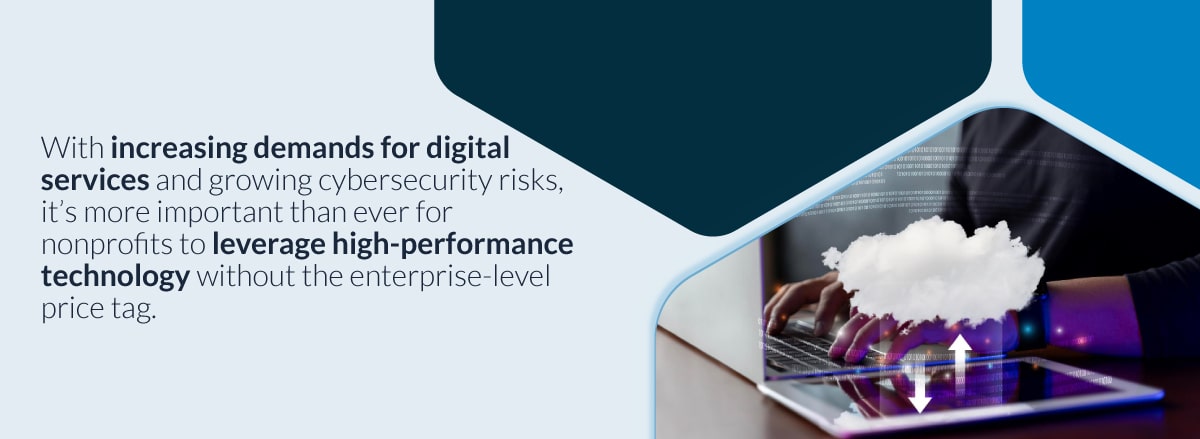
Nonprofit organizations operate in a unique space—driven by mission, limited by budget. With increasing demands for digital services and growing cybersecurity risks, it’s more important than ever for nonprofits to leverage high-performance technology without the enterprise-level price tag.
That’s where Managed IT Services come into play. Some benefits of managed IT services include:
1. Predictable, Scalable Monthly Costs
Managed Service Providers (MSPs), such as CloudScale365, offer flat-rate pricing models, enabling nonprofits to plan their IT spending with confidence. MSPs eliminate the surprise costs of emergency fixes or unplanned upgrades, helping organizations stay within strict budget limits.
2. Access to Enterprise-Grade Tools—Without the Overhead
Cloud productivity platforms, secure email, endpoint protection, virtual desktops, backup and disaster recovery—these are the same tools Fortune 500 companies use. Through managed IT services, nonprofits can access these solutions as-a-service, avoiding large capital expenditures and licensing complexity.
3. No Need for In-House IT Teams
Hiring, training, and retaining qualified IT professionals is costly and often out of reach for smaller organizations. Managed IT services offer 24/7 expert support, system monitoring, and incident response—at a fraction of the cost of maintaining an internal team.
4. Reduced Downtime, Improved Efficiency
System outages, slow networks, and outdated software can interrupt service delivery and reduce staff productivity. Proactive IT management keeps systems running smoothly, updates software regularly, and prevents problems before they impact operations.
5. Built-In Cybersecurity and Compliance
Nonprofits are responsible for handling sensitive data, including donor details, health records, and financial information. Managed IT providers offer layered security, patch management, and compliance support (e.g., HIPAA, PCI) to reduce risk and protect reputation—without the need to build these capabilities in-house.
CloudScale365 is Here to Help Nonprofits Deal with the Budget Cuts
Technology-driven nonprofits often depend on consistent funding to support digital infrastructure, staff operations, and program delivery. In times of reduced federal support, operational efficiency and scalable IT solutions become even more critical.
CloudScale365 supports nonprofits by delivering scalable, secure, and cost-effective managed IT services. Whether it’s migrating to cloud-based systems, tightening cybersecurity, or improving uptime for mission-critical platforms, our team helps nonprofits do more with less.
By streamlining tech infrastructure, we help organizations:
- Save on operational costs
- Protect sensitive data
- Stay resilient through funding changes
- Focus staff time on mission-driven work—not IT issues
At CloudScale365, as a Managed Services Provider (MSP) with a long-standing commitment to the nonprofit sector, we recognize these challenges. Our solutions can help reduce IT costs, improve security, and ensure reliable access to the tools needed to continue their missions, even amid budget uncertainty.
Whether your organization provides healthcare, education, social services, or international aid, we’re here to help optimize your technology environment, allowing you to focus on making a meaningful impact.
If your nonprofit is ready to streamline operations, strengthen cybersecurity, and stretch your IT budget further, we’re here to support you every step of the way. Contact CloudScale365 today to learn how our tailored managed services can help you stay focused on what matters most—your mission. Talk with an expert today!
DDoS Cloud Protection: How to Effectively Test Your Strategy
Distributed Denial of Service (DDoS) attacks increased by 203% in 2022, with the average attack resulting in $ 50,000 per hour in damages. Your organization’s ability to withstand these attacks depends on implementing strong DDoS cloud protection strategies. But implementation isn’t enough.
Testing your DDoS cloud protection strategy is crucial to:
- Identify potential weaknesses in your defense systems
- Validate your incident response procedures
- Ensure your protection measures can handle real-world attack scenarios
- Maintain business continuity during an attack
We’ll walk you through effective testing methods, helping you build a strong defense system against evolving cyber threats. You’ll learn practical ways to simulate testing, important monitoring metrics, and proven techniques to improve your organization’s security posture.
The Evolution of DDoS Attacks
A DDoS attack disrupts routine online services by overwhelming them with a flood of malicious traffic from multiple sources. Think of it as a traffic jam created intentionally to prevent legitimate users from reaching their destination.
DDoS attacks come in three main forms, which are often combined to maximize impact. The 2020 AWS attack demonstrated this hybrid approach using volumetric and application-layer techniques to achieve a record-breaking 2.3 Tbps attack.
Modern DDoS attacks have evolved beyond simple flooding tactics. Attackers now use AI-driven tools to identify and exploit vulnerabilities, making detection and mitigation increasingly complex. Organizations face sophisticated attacks that can adapt to defensive measures and persist for extended periods.
To mitigate these risks, it’s essential for businesses, especially those relying heavily on online services, to adopt robust hosting solutions such as Managed Application Hosting which frees development teams from server administration tasks or consider WordPress Hosting for their website needs. Furthermore, utilizing Cloud VPS solutions can provide the scalability and security required in today’s digital landscape while also offering promotional benefits like unlocking two months free on your cloud VPS.
Testing Your DDoS Protection Strategy
Regular testing helps identify vulnerabilities before malicious actors exploit them, ensuring your cloud DDoS protection service performs as expected during an actual attack. Inadequate protection strategies can lead to:
- Revenue Loss: Service disruptions cost businesses an average of $22,000 per minute
- Damaged Reputation: Customer trust erodes when services become unavailable
- Data Breaches: DDoS attacks can serve as smokescreens for other cyber threats
- Compliance Violations: Service outages may breach regulatory requirements
Your incident response planning depends on thorough testing protocols. A well-tested DDoS protection strategy allows you to:
- Measure response times under various attack scenarios
- Validate your protection service providers’ effectiveness
- Assess your team’s readiness to handle attacks
- Fine-tune alert thresholds and response procedures
Real-world testing reveals gaps that theoretical planning might miss. By simulating attacks against your infrastructure, you’ll understand how your systems behave under stress and whether your DDoS protection solutions can handle emerging threat vectors.
Moreover, integrating business continuity and disaster recovery plans into your strategy can significantly enhance resilience against such attacks.
Having a robust service level agreement with your hosting provider that outlines the expected performance standards during an attack is essential. Furthermore, engaging with a managed service provider can provide additional support and resources for effective DDoS protection. Lastly, implementing offsite backups can safeguard your data against potential breaches during a DDoS attack.
Working with reputable DDoS protection service providers like CloudScale365 ensures your testing protocols align with industry best practices. These partnerships provide access to specialized tools and expertise needed to conduct comprehensive assessments of your defense capabilities.
Simulation Testing for DDoS Protection
Simulation testing creates controlled environments to replicate DDoS attacks, allowing organizations to assess their defense mechanisms without risking production systems. This testing method provides insights into system vulnerabilities and response capabilities through realistic attack scenarios.
Best Practices for Simulation Testing
- Create an Effective Test Environment. A successful test environment requires:
- Isolated network segments to prevent interference with live services
- Replicated infrastructure matching production configurations
- Traffic generators capable of simulating various attack patterns
- Monitoring tools to measure system responses
- Backup systems ready for failover testing
- Start Small and Scale Up. Begin with basic attack patterns, then gradually increase traffic volume and add complexity to attack vectors.
- Test Multiple Scenarios.
- Layer 3/4 flood attacks
- Application layer attacks
- Mixed-vector attacks
- Peak traffic situations
- Document Everything. Record baseline performance metrics, track system responses to different attack types, and log all configuration changes during testing.
Evaluating Service Responses
Your simulation testing should measure:
- Time to detect attacks
- Effectiveness of mitigation measures
- System performance under stress
- Recovery time after attack cessation
- Impact on legitimate user traffic
Your simulation results may reveal:
- Bottlenecks in your infrastructure
- Weaknesses in detection systems
- Areas requiring additional capacity
- Configuration improvements needed
- Response team readiness levels
Real-World Scenario Creation
Build authentic test cases by:
- Analyzing recent DDoS attack patterns
- Incorporating multiple attack vectors
- Simulating peak traffic conditions
- Testing during different time periods
- Including legitimate traffic patterns
Measuring Success
A robust simulation program requires regular updates to reflect new attack methods and evolving threat landscapes. Your test scenarios should adapt to include emerging DDoS techniques and account for changes in your infrastructure.
Key performance indicators during testing include packet loss rates, network latency, CPU utilization, memory usage, application response times, and false positive rates. Your simulation testing strategy should balance thoroughness with practical limitations, ensuring comprehensive coverage while maintaining manageable test scenarios.
Tools and Services for Testing DDoS Protection
DDoS testing tools play a crucial role in validating your protection strategy. These tools generate traffic through various methods:
- Protocol-based attacks: TCP, UDP, ICMP floods
- Application layer attacks: HTTP GET/POST floods
- Volumetric attacks: DNS amplification simulations
- Mixed-vector attacks: Combined attack patterns
DDoS Protection Tools: Key Features to Consider
- Attack simulation accuracy
- Reporting capabilities
- Ease of use
- Integration options
- Scalability
- Real-time monitoring
- Cost-effectiveness
In light of the increasing complexity of DDoS attacks, it’s beneficial to consider optimizing your IT spend in 2024 by leveraging managed services. These professional testing services complement the aforementioned tools by providing:
- Expert guidance during testing
- Custom attack scenario development
- Result interpretation
- Mitigation strategy recommendations
- Compliance verification
Combining specialized tools and professional services creates a robust testing environment that accurately reflects real-world DDoS threats.
Monitoring During Testing: Metrics That Matter
Effective DDoS protection testing requires comprehensive monitoring of system performance metrics. Your security strategy’s success depends on capturing and analyzing the right data points during simulated attacks. Your monitoring setup should include automated data collection and visualization capabilities, allowing your team to identify patterns, detect anomalies, and make data-driven decisions about your DDoS protection strategy improvements.
Essential Performance Metrics to Track
- Network throughput and bandwidth utilization
- Server CPU and memory usage
- Application response times
- Connection pool status
- Request queue length
- Error rates and types
Setting up diagnostic logs creates a detailed record of system behavior during testing. Configure your logging system to capture traffic patterns and anomalies, authentication attempts, resource allocation, system state changes, security events, and application-specific metrics.
Alert Configuration Best Practices
- Set baseline thresholds for normal operations
- Create multi-level alert triggers
- Enable real-time notifications
- Configure alert correlation rules
- Document alert response procedures
User experience metrics provide crucial insights into your protection strategy’s effectiveness:
- Page load times
- Transaction completion rates
- Service availability
- API response times
- Client-side errors
Performance Monitoring Tools Integration
- Network analyzers
- Application Performance Management (APM) solutions
- System resource monitors
- Custom logging frameworks
- Security Information and Event Management (SIEM) systems
Employee Training for Enhanced Security
DDoS protection requires a well-trained workforce ready to identify and respond to potential threats. Regular security awareness sessions help staff understand common attack patterns, the latest threats, best practices to maintain security, and proper incident reporting procedures.
At a baseline level, your security team needs specific training to:
- Recognize early warning signs of DDoS attacks
- Execute incident response procedures
- Monitor system performance metrics
- Implement mitigation strategies
- Hands-on simulations with DDoS protection tools
- Documentation review and updates
- Role-specific security responsibilities
- Communication protocols during attacks
Your security training program should adapt to new threats and technologies. Schedule quarterly refresher courses to keep your team’s skills sharp and current with emerging DDoS attack methods, and consider implementing certification requirements for security team members to maintain high expertise levels in DDoS cloud protection strategies.
Safeguard Your Organization with CloudScale365
The success of your DDoS cloud protection strategy depends on effective testing methods, comprehensive monitoring, and quick response capabilities. Organizations must prioritize these elements to maintain smooth operations and safeguard their digital assets from sophisticated cyber threats.
Contact a CloudScale365 expert to develop and implement your organization’s DDoS cloud protection strategy.
FAQs (Frequently Asked Questions)
What are DDoS attacks and how do they impact organizations?
DDoS (Distributed Denial of Service) attacks are malicious attempts to disrupt the normal functioning of a targeted server, service, or network by overwhelming it with a flood of internet traffic. These attacks can lead to significant service disruption, financial losses, and damage to an organization’s reputation.
What types of DDoS attacks exist?
There are three main types of DDoS attacks: volumetric attacks, which flood the bandwidth; protocol attacks, which exploit vulnerabilities in network protocols; and application-layer attacks, which target specific applications or services. Real-world examples include DNS amplification (volumetric), SYN flood (protocol), and HTTP GET flood (application-layer) attacks.
Why is testing DDoS protection strategies important?
Testing DDoS protection strategies is crucial for ensuring service continuity and identifying gaps in defenses. Inadequate protection can lead to severe consequences during an actual attack, making robust testing essential for effective incident response planning.
What is simulation testing for DDoS protection?
Simulation testing involves creating controlled environments that mirror production systems to test DDoS protection strategies without affecting live services. This method allows organizations to craft realistic attack scenarios and evaluate their service responses effectively.
What tools can be used for testing DDoS protection?
Popular tools for simulating DDoS attacks include BreakingPoint Cloud, MazeBolt, and Red Button. These tools help generate traffic that tests defenses against various attack vectors and provide insights into the effectiveness of existing protection measures.
How can organizations ensure continuous improvement in their DDoS protection strategies?
Organizations should engage in ongoing testing and regularly update their protection strategies based on the latest threat intelligence and simulation outcomes. Continuous improvement is vital due to the evolving nature of cyber threats.
PACS Hosting: HIPAA-Compliant Medical Imaging
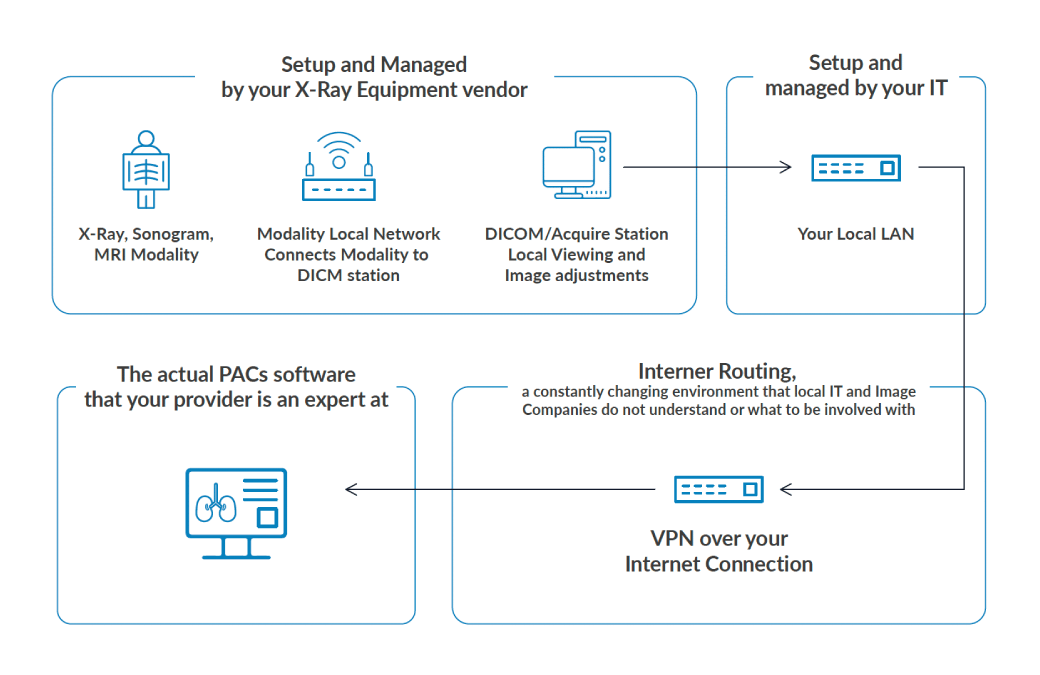
Medical imaging and PACS hosting plays a vital role in modern diagnostics, helping healthcare professionals detect, diagnose, and treat various conditions. However, as imaging technology advances, the sheer volume of medical images increases exponentially, posing challenges for hospitals, clinics, and radiology centers in secure storage, efficient management, and compliance with healthcare regulations.
Traditional Picture Archiving and Communication Systems (PACS) rely on on-premises servers, which are expensive, hard to scale, and vulnerable to security risks. Cloud-based PACS hosting offers a transformative solution by enhancing medical imaging security, ensuring HIPAA compliance, and improving patient care.
Challenges of Traditional PACS Storage
Healthcare providers relying on on-premise PACS solutions face several limitations:
- High Costs – Maintaining physical servers requires significant upfront investment and ongoing IT support.
- Limited Scalability – Expanding storage capacity can be costly and complex.
- Security Risks – On-premise systems are susceptible to cyber threats, data loss, and hardware failures.
- Access Limitations – Remote access to medical images is often slow or restricted.
These challenges make cloud PACS hosting a compelling alternative. It offers a cost-effective, scalable, and highly secure solution for medical imaging storage.
Key Benefits of Cloud-Based PACS Solutions
1. Enhanced Security for Medical Imaging
Healthcare cybersecurity threats are on the rise, with ransomware attacks and unauthorized data breaches posing serious risks. Cloud PACS solutions significantly improve security through:
- Data Encryption – Protects sensitive imaging data both at rest and in transit.
- Multi-Factor Authentication (MFA) – Adds an extra layer of access security.
- Continuous Threat Monitoring – Provides real-time security updates and automated threat detection.
With these advanced security measures, cloud-based PACS hosting ensures patient data protection while meeting strict regulatory standards.
2. HIPAA-Compliant PACS Hosting & Regulatory Compliance
HIPAA-compliant PACS hosting is essential for healthcare providers handling patient data. Cloud PACS solutions help organizations stay compliant with the following:
- Automated Backups & Disaster Recovery – Ensures data protection and fast recovery in case of an outage.
- Audit Logging & Reporting – Tracks all access and changes for compliance verification.
- Role-Based Access Controls – Limits access to sensitive patient data to authorized personnel only.
By utilizing HIPAA-compliant cloud storage, healthcare providers can securely store and manage medical imaging data without the burden of maintaining compliance in-house.
3. Remote Access & Seamless Collaboration
One of the biggest advantages of cloud-based PACS hosting is the ability to access imaging data anytime, anywhere. This enables:
- Radiologists & Physicians – Faster remote image access for improved diagnoses.
- Multi-Site Healthcare Networks – Efficient sharing between hospitals and specialists.
- Emergency Care Providers – Quick access to critical imaging for time-sensitive treatments.
This seamless accessibility enhances collaboration, accelerates decision-making, and improves patient care outcomes.
4. Cost-Effective & Scalable PACS Storage
On-premise PACS solutions require costly hardware, IT personnel, and maintenance investments. Cloud PACS hosting provides a more flexible and budget-friendly alternative:
- Lower IT Costs – No need for expensive physical infrastructure.
- On-Demand Scalability – Easily expand storage as imaging needs grow.
- Pay-As-You-Go Pricing – Reduce wasteful spending and optimize IT budgets.
Healthcare organizations can future-proof their IT infrastructure with scalable, cloud-based storage while cutting costs.
5. Future-Proof Healthcare IT with Cloud PACS
Technology in healthcare is evolving rapidly, and cloud PACS solutions pave the way for future innovations, such as:
- AI-Powered Image Analysis – AI-driven diagnostics integrated directly into PACS.
- Interoperability with EHR Systems – Seamless integration with Electronic Health Records (EHRs).
- Faster Implementation of New Technologies – Cloud solutions allow easy deployment of updates and security patches.
By adopting secure cloud PACS hosting, healthcare organizations can stay ahead of industry trends while improving patient care and operational efficiency.
Upgrade Your PACS Hosting with CloudScale365
CloudScale365 provides secure, HIPAA-compliant PACS hosting designed for hospitals, clinics, and radiology centers. Our cloud PACS solutions offer:
- Advanced encryption & cybersecurity to protect medical imaging data.
- Regulatory compliance with HIPAA, HITECH, and GDPR standards.
- Scalable, cost-efficient storage with no hardware limitations.
- 24/7 access & seamless collaboration for healthcare teams.
By choosing CloudScale365, you eliminate the hassle of managing a complex PACS infrastructure in-house while ensuring your imaging data is securely and efficiently stored in the cloud.
Ready to transform your PACS storage? Contact us today to learn how CloudScale365’s cloud PACS hosting can enhance security, compliance, and efficiency in your healthcare organization.
Cloud Security Audits for Regulatory Compliance
As businesses increasingly rely on cloud services, the risk of cyberattacks also increases. Between 2019 and 2022, cloud-based cyberattacks increased by 150%, with the average cost of a data breach reaching $4.35 million. Regular cloud security audits are essential for maintaining a strong defense and ensuring compliance with industry regulations. In this post, we’ll cover:
- Why cloud security audits are essential
- Key components of a successful audit
- Best practices for maintaining security and compliance
- Real-world examples of effective cloud security strategies
The Importance of Regular Cloud Security Audits for Compliance and Threat Detection
Cyber threats are growing more complex. Research shows that cybercrime costs will reach $10.5 trillion annually by 2025. Attackers scan cloud environments for vulnerabilities every 60 seconds, making it critical to identify and close security gaps.
Fast Facts on Cloud Threats:
- 43% of organizations face daily cyberattack attempts
- Misconfigurations cause 65% of cloud breaches
- 92% of breaches stem from human error
- AI-powered attacks have increased by 235% since 2021
Key Industry Regulations Requiring Cloud Security Audits:
- GDPR: Requires regular security assessments and data protection measures
- HIPAA: Mandates ongoing evaluation of security controls for healthcare data
- PCI DSS: Demands quarterly vulnerability scans for payment card data
- SEC & FINRA: Cybersecurity guidelines set by the Securities and Exchange Commission (SEC) and Financial Industry Regulatory Authority (FINRA) to protect investor data and prevent fraud.
- SOX: Necessitates periodic IT security audits for financial reporting systems
Cloud Security Audits for Reducing Risk and Maintaining Compliance
Implementing automated security audit tools enables continuous compliance monitoring while providing real-time alerts for potential security gaps. This proactive approach helps organizations maintain regulatory compliance while staying ahead of emerging threats.
Critical Areas Covered in Cloud Security Audits:
- Data storage locations and cross-border transfers
- Access control mechanisms and authentication protocols
- Encryption standards for data at rest and in transit
- Incident response procedures and documentation
- Third-party service provider compliance
Key Components to Assess During Cloud Security Audits
A comprehensive cloud security audit requires systematic evaluation of several critical components. The interconnected nature of these components requires a holistic evaluation approach. Voluntary waivers of SaaS security solutions can help mitigate risks associated with third-party software. Furthermore, implementing robust email security measures is crucial as email remains a primary vector for cyber threats. Lastly, don’t overlook the importance of endpoint security, given that endpoints often serve as entry points for attackers into your network. Key components to assess during a cloud security audit include:
1. Access Controls and Identity Management
- User authentication protocols
- Role-based access control (RBAC) implementation
- Multi-factor authentication (MFA) status
- Password policies and rotation schedules
- Session management controls
2. Network Security Infrastructure
- Firewall configurations and rule sets
- Intrusion Detection Systems (IDS) performance
- Virtual Private Network (VPN) settings
- Network segmentation effectiveness
- Traffic monitoring capabilities
3. Data Protection Measures
- Encryption algorithms for data at rest
- Transport Layer Security (TLS) for data in transit
- Key management practices
- Data backup procedures
- Data retention policies
4. Security Monitoring Systems
- Log collection and analysis tools
- Real-time alert mechanisms
- Security Information and Event Management (SIEM) setup
- Incident response procedures
- Threat intelligence integration
Moving from Periodic to Continuous Monitoring
Continuous monitoring turns traditional audits into a dynamic defense strategy. Instead of discovering issues during scheduled audits, you’ll spot and respond to threats in real time.
Benefits of Continuous Monitoring:
- Real-time asset discovery and tracking
- Behavioral analysis to detect unusual activity
- Automated alerts for faster response
- Ongoing compliance tracking
Integration Strategies:
- Centralized Dashboards: Consolidate metrics and alerts in one place
- Automated Response Protocols: Predefined actions to mitigate threats quickly
- Resource Optimization: Adjust security controls based on real-time data
Best Practices for Ensuring Robust Cloud Security Posture
Building a strong cloud security posture requires a balanced approach of technology, processes, and user training. Combining human expertise, technological advancement, and systematic processes ensures a strong defense against evolving cyber threats. These practices work together to create a comprehensive security shield for your cloud environment:
1. Identity and Access Management (IAM)
- Implement role-based access control (RBAC) to limit user permissions
- Enable multi-factor authentication (MFA) across all cloud services
- Regularly review and remove unused or dormant accounts
- Set up automated user provisioning and de-provisioning workflows
2. Security Awareness Training
- Schedule monthly security updates and training sessions
- Create interactive phishing simulation exercises
- Develop clear security policies and procedures documentation
- Build incident response playbooks for common security scenarios
3. AI/ML Integration for Enhanced Security
- Deploy AI-powered threat detection systems to identify unusual behavior
- Use machine learning algorithms for predictive security analytics
- Implement automated response mechanisms for known threat patterns
- Leverage AI for real-time security log analysis and correlation
4. Multi-layered Security Approach
- Secure both cloud infrastructure and applications
- Encrypt data at rest and in transit
- Maintain network segmentation and micro-segmentation
- Deploy Web Application Firewalls (WAF) for external-facing applications
- Implement Zero Trust security principles
5. Security Configuration Management
- Conduct regular security configuration reviews
- Perform automated compliance checking
- Scan Infrastructure as Code (IaC) for security vulnerabilities
- Monitor and enforce container security practices
Case Studies: Real-world Examples of Successful Cloud Security Audits
Healthcare Provider
“We discovered unauthorized access points we never knew existed. The vulnerability scanning program helped us protect sensitive patient data and maintain HIPAA compliance.” – Chief Information Security Officer
This healthcare provider’s success story demonstrates the power of proactive security measures, including:
- Real-time threat monitoring
- Automated vulnerability assessments
- Regular penetration testing
- Employee security awareness training
Financial Services Firm
A financial services firm leveraged cloud security audits to strengthen its infrastructure:
- Identified misconfigured cloud storage buckets
- Fixed API vulnerabilities
- Implemented stronger access controls
- Enhanced encryption protocols
Key Takeaways for Businesses
These organizations demonstrate how systematic vulnerability scanning and security audits create robust cloud security postures while maintaining regulatory compliance by deploying:
- Regular scans to reveal hidden vulnerabilities
- Automated tools to catch issues human auditors might miss
- Employee training to significantly reduce security incidents
- Security tools to improve detection accuracy
- Documentation of security processes to ensure consistent implementation
What’s Next for Cloud Security?
Future advancements will make cloud security more effective:
- AI-powered tools for advanced threat detection
- Automated response systems for real-time mitigation
- Zero-Trust models for enhanced access control
- Quantum-safe encryption for post-quantum security
Next Steps:
- Schedule regular security audits
- Implement continuous monitoring
- Invest in employee security training
- Partner with a trusted security provider
Let’s Develop Your Complete Cloud Security Strategy
Remember: Cloud security isn’t a destination—it’s an ongoing journey. Your organization’s resilience depends on maintaining vigilant security practices and adapting to new challenges. We’re here to help—contact a CloudScale365 cloud security expert for a personalized vulnerability assessment and comprehensive cloud security strategy.
FAQs (Frequently Asked Questions)
What are the key components to evaluate during a cloud security audit?
Key components include access controls, network security, data protection, and incident response systems. Evaluating these areas ensures compliance and strengthens security.
Why are regular cloud security audits important?
Regular audits help identify vulnerabilities, improve compliance with industry regulations, and defend against evolving cyber threats.
What strategies improve vulnerability scanning in the cloud?
Using automated and manual scanning provides comprehensive coverage. Automated tools improve efficiency while manual reviews add depth.
How does continuous monitoring improve cloud security?
Continuous monitoring detects real-time threats, enabling faster response and better compliance. Aligning monitoring with your overall IT strategy strengthens security.
The Ultimate Cybersecurity Checklist for Financial Firms & Advisors
Cybersecurity for financial firms must evolve at the same pace as the threats. Wealth managers, registered investment advisors (RIAs), and financial firms must implement strong cybersecurity measures to protect client data, prevent fraud, and comply with evolving regulations. A single security breach can lead to financial losses, reputational damage, and legal consequences. To help financial professionals strengthen their cybersecurity framework, we’ve created this comprehensive cybersecurity checklist tailored for financial advisors and wealth managers in 2025.
Cybersecurity for Financial Firms – First Steps: Conduct a Risk Assessment and Develop a Cybersecurity Strategy
Before implementing new policies or procedures, perform a financial IT risk management assessment to identify vulnerabilities and potential security threats. Understanding the lay of the land—where your financial firm currently stands—will allow you to develop a cybersecurity strategy that aligns with your business goals and compliance requirements. Then, you will have a framework for regularly updating security policies and procedures to address new cyber threats and industry regulations.

Ensure Compliance with Regulatory Standards
Adhering to industry regulations such as those of the SEC, FINRA, GDPR, PCI DSS, ISO 27001, and SOC 2 is essential. CloudScale365 provides you with a dedicated compliance team to monitor evolving cybersecurity laws and standards. We also conduct regular cybersecurity audits to ensure compliance with industry best practices in the financial sector.
6 Important Security Compliance Rules to Follow
- SEC & FINRA Compliance – Ensure adherence to cybersecurity guidelines set by the Securities and Exchange Commission (SEC) and Financial Industry Regulatory Authority (FINRA) to protect investor data and prevent fraud.
- GDPR (General Data Protection Regulation) – If handling European clients, comply with GDPR to ensure proper data protection, consent management, and breach notification procedures.
- PCI DSS (Payment Card Industry Data Security Standard) – If processing payments, follow PCI DSS requirements to safeguard payment card information and prevent data breaches.
- ISO 27001 Certification – Implement an information security management system (ISMS) aligned with ISO 27001 standards to establish a structured cybersecurity framework.
- SOC 2 Compliance – For firms using cloud-based platforms, SOC 2 ensures secure handling of financial data and client information.
- Data Encryption & Privacy Regulations – Encrypt sensitive client financial data and adhere to regional privacy laws to prevent unauthorized access and maintain trust.
Data Security for Finance Professionals and Encryption Measures
We recommend encrypting all sensitive client financial data in transit and at rest to prevent unauthorized access. Deploying multi-factor authentication (MFA) ensures secure access to client accounts and financial platforms, while tokenization will mask sensitive information and reduce the risk of data breaches. Finally, you should regularly back up critical client data and store it securely offsite for disaster recovery.
Strengthen Network Security and Endpoint Protection
The best practice is implementing firewalls, intrusion detection systems (IDS), and intrusion prevention systems (IPS) to filter malicious traffic targeting financial systems. You should also ensure endpoint protection on all advisor and employee devices, including updated security software and monitoring tools. We advise adopting a zero-trust security model, which requires continuous verification for users and devices accessing financial data.
Perform Penetration Testing and Continuous Threat Monitoring
Penetration testing (pen testing) is a simulated cyberattack conducted to evaluate the security of a system, network, or application. The goal is to identify vulnerabilities that attackers could exploit and assess the effectiveness of security controls.
- Conduct penetration testing on wealth management platforms to identify security weaknesses, such as software flaws, misconfigurations, or weak passwords.
- Hire third-party security firms for red-team exercises to simulate real-world cyberattacks targeting financial advisors.
- Deploy real-time threat monitoring tools and establish an incident response team to handle cyber threats.
Check out our Free External Penetration Test offer here.
 Cyber Risk Management for Financial Firms: Educate Employees with Cybersecurity Awareness Training
CloudScale365 recommends that financial advisors and staff receive regular cybersecurity training. This training should include periodic detection of phishing, malware, and social engineering attacks. It is also important to establish clear protocols for reporting suspicious activity to IT security teams and periodically conduct simulated cyberattack exercises to assess employee readiness and improve response strategies.
Implement Vendor Risk Management Policies
It is critical to assess third-party vendors and technology providers for cybersecurity compliance before integrating their systems. To mitigate third-party risks, enforce strict security guidelines, continuously monitor vendor security practices, and require vendors to adhere to financial industry cybersecurity standards.
Develop an Incident Response and Disaster Recovery Plan
One useful protocol is a detailed incident response plan outlining roles, responsibilities, and response procedures specific to financial advisors. Disaster recovery drills to test system resilience and minimize downtime and secure offsite and cloud-based backups to ensure quick recovery after a cyber incident are also essential.
Secure Cloud Infrastructure and Remote Work Policies
Financial organizations should implement robust security measures for cloud-based financial advisory applications to protect sensitive data. Requiring VPN use and endpoint security solutions for remote advisors accessing client information and enforcing role-based access controls (RBAC) to restrict access based on user responsibilities and client data sensitivity will also mitigate risk.
How Managed Service Providers (MSPs) Can Help
Managed Service Providers (MSPs) such as CloudScale365 play a crucial role in enhancing cybersecurity for financial advisors and wealth managers by offering comprehensive security and compliance solutions tailored to their needs. We provide Mobile Device Management (MDM) to secure advisors’ smartphones, tablets, and laptops, ensuring client data remains protected even on the go. We also implement advanced endpoint security, safeguarding financial professionals from malware, phishing attacks, and unauthorized access. CloudScale365 helps firms stay compliant with evolving regulations by offering automated compliance monitoring and reporting, reducing the risk of costly penalties. Additionally, we provide continuous threat monitoring and incident response services, allowing advisors to focus on their clients while security experts handle potential cyber threats. By partnering with CloudScale365, financial professionals gain access to cutting-edge cybersecurity tools and proactive protection against the ever-changing threat landscape.
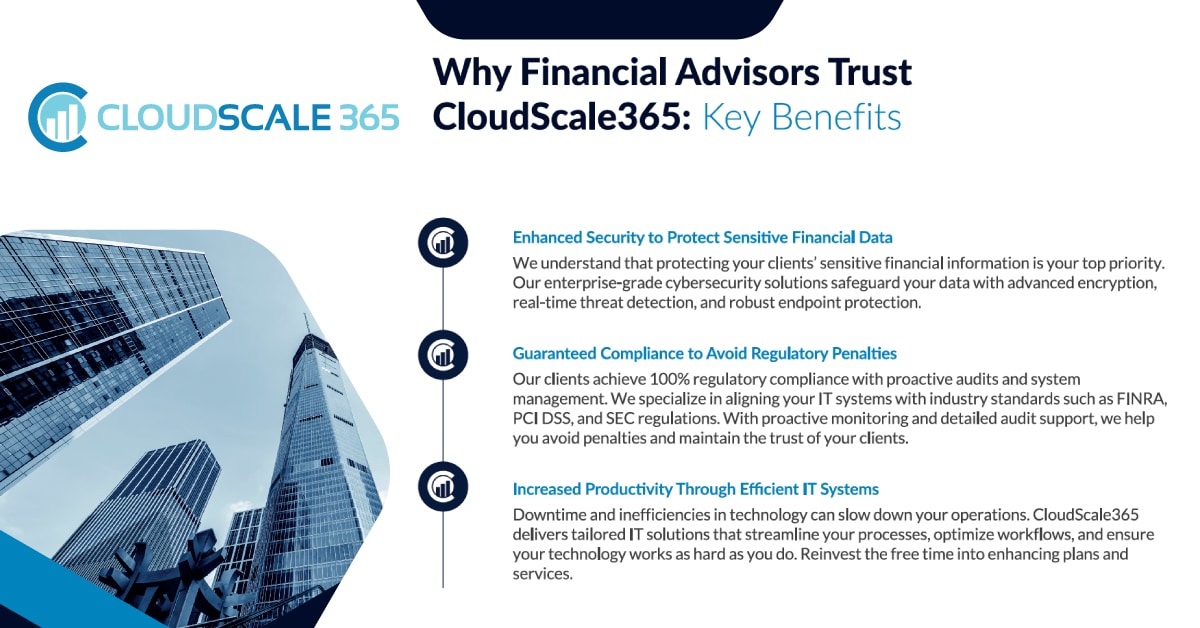
By following this cybersecurity checklist for financial advisors and wealth managers, professionals can significantly strengthen their security posture, protect client assets, and maintain compliance with regulatory standards. As cyber threats continue to evolve, maintaining a proactive cybersecurity strategy will help financial advisors build trust with clients and stay one step ahead of cybercriminals. Implementing these best practices will minimize risks, enhance data security, and ensure regulatory compliance in 2025 and beyond.
Top IT Trends Transforming Financial Services
The financial services industry is undergoing a technological revolution. As firms navigate heightened compliance requirements, evolving customer expectations, and increasing security threats, IT solutions drive efficiency, growth, and innovation. Here are the financial services IT trends in 2025 – and how CloudScale365 can help firms stay ahead.
Financial Services IT Trend #1: Increased Focus on Cybersecurity
The financial industry is among the most targeted sectors for cyberattacks, given the sensitive nature of the data it handles and the high stakes involved. From phishing schemes to ransomware, the sophistication and frequency of cyberattacks continue to rise. Cybersecurity is a top priority for financial firms striving to protect their clients, assets, and reputations.
The Growing Threat Landscape
- Increasing Attacks: By 2025, cyberattacks will cost the global economy over $10.5 trillion annually, making cybersecurity investments non-negotiable for financial organizations (Source: Cybersecurity Ventures).
- Evolving Threats: Tactics like zero-day exploits and supply chain attacks target vulnerabilities within software and third-party vendors.
- Regulatory Compliance: PCI DSS, FINRA, GDPR, and CCPA require strict data protection measures. Non-compliance can result in fines, reputational damage, and loss of customers.
CloudScale365’s Comprehensive Cybersecurity Solutions for Financial Service Providers
CloudScale365 has a multi-layered approach to cybersecurity. We ensure financial firms are protected from both external and internal threats:
24/7/365 Monitoring and Threat Detection: Continuous system monitoring allows us to detect and respond to threats in real-time, reducing the risk of breaches and downtime.
Advanced Data Backup and Recovery: Our automated backup solutions protect sensitive financial data and can swiftly recover it during an attack.
Regulatory Expertise: We help firms maintain compliance with ever-evolving regulations, providing detailed reporting and documentation to support audits.
Financial Services IT Trend #2: Cloud Migration for Scalability and Efficiency
Your business needs scalable, agile, cost-effective IT solutions to stay competitive while meeting operational demands.
Scalability: Cloud solutions allow firms to scale resources up or down as needed, accommodating growth or seasonal demand without significant upfront investments.
Cost Efficiency: Your business can reduce expenses for maintaining on-premises infrastructure, such as hardware upgrades and physical server maintenance.
Business Continuity: Cloud environments provide robust disaster recovery capabilities, ensuring minimal disruption during outages or cyber incidents.
Hybrid Cloud Solutions: The Best of Both Worlds
Hybrid cloud environments are particularly appealing for financial firms, offering a balance between the control of private clouds and the flexibility of public clouds.
Private Clouds: Ideal for storing sensitive data that must comply with stringent regulations.
Public Clouds: Cost-effective for hosting applications and services that don’t require heightened security measures.
CloudScale365’s Expertise in Cloud Migration
At CloudScale365, we specialize in migrating financial firms’ IT infrastructure to the cloud with minimal disruption to operations:
Tailored Solutions: Our team assesses your current systems and creates a customized hybrid cloud strategy.
Compliance Integration: We ensure your cloud environment meets regulatory requirements like GDPR, HIPAA, or PCI DSS.
Easy Migration: We ensure a smooth transition from legacy systems to modernized cloud platforms, supporting growth and efficiency.
Financial Services IT Trend #3: Personalized Customer Experiences Through Data Analytics
Financial advisors are leveraging big data and AI to provide personalized financial solutions. Predictive analytics enables firms to deliver tailored insights and improved customer retention.
The Market Impact: The financial analytics market is expected to grow to $19.8 billion by 2025, as firms adopt tools to improve decision-making and customer experiences (Source: MarketsandMarkets).
CloudScale365’s Offering: We design high-performance IT systems optimized for data analytics, empowering firms to unlock actionable insights and elevate client relationships.
Challenges Facing Financial IT in 2025
While the trends offer tremendous potential, financial firms also face challenges that could hinder their ability to capitalize on them:
- Cybersecurity Threats: The rise of sophisticated attacks, such as zero-day exploits and supply chain attacks, can lead to catastrophic data breaches.
- Compliance Complexities: Maintaining ever-evolving regulations is resource-intensive and requires meticulous IT management.
- Talent Shortages: The demand for specialized blockchain and cloud computing IT skills often outpaces supply.
- Legacy Systems: Many firms need help to modernize outdated IT infrastructure, which hampers their ability to adopt new technologies.
How CloudScale365 Helps Overcome These Challenges
- Advanced Cybersecurity: Our proactive approach includes real-time monitoring, AI-driven threat detection, and automated compliance reporting, helping firms avoid costly breaches and fines
- Scalable Cloud Solutions: We assist in transitioning from legacy systems to hybrid or fully cloud-based environments, improving flexibility and efficiency.
- Expert IT Support: Our team bridges the skills gap, offering expertise in cutting-edge technologies like blockchain, AI, and advanced analytics.
- Business Continuity: We will design and implement a disaster recovery plan, ensuring your business is operational at any time.
- Managed Desktops: Start protecting, optimizing, and future-proofing your business’s IT environment with a solution designed to maximize your team’s productivity and keep your systems secure around the clock.
- Co-Managed IT: Financial institutions are prime targets for cyberattacks. Co-managed IT services offer expertise in advanced security measures such as intrusion detection, endpoint protection, and data encryption. Providers must comply with laws like PCI DSS, GDPR, and SOX. Co-managed IT ensures continuous monitoring and auditing to meet regulatory requirements.
Why CloudScale365?
Recognized on the Kitces Advisor Technology Map for the third consecutive year, CloudScale365 is a trusted partner for financial advisors. From secure cloud solutions to compliance expertise, we’re here to help your firm thrive in 2025 and beyond.
 “CloudScale365 is honoured to be recognized as a leading managed services provider for financial advisors by industry leader Kitces,” said Patrick Hannon, CEO of CloudScale365.com. “From regulation to compliance, the financial industry is already complex. Our mission is to simplify IT, mitigate risk, and provide unparalleled support, enabling financial firms to focus on delivering value to their clients.”
Ready to future-proof your IT strategy? Contact us today to learn more.
CloudScale365 Featured in Kitces’ FinTech Solutions Map
CloudScale365 announces that we are featured again in Michael Kitces’ FinTech Solutions Map. This prestigious resource highlights proven technology providers serving financial advisors and wealth managers, organizing them into clear categories based on their use cases. The Map, which includes 384 companies across 33 categories, is an essential guide for advisors building and refining their tech stacks.
The fintech ecosystem continues to expand at a breakneck pace. New advisor technologies are introduced almost weekly, offering innovative solutions to optimize operations and client offerings. Amid this rapid growth, Kitces’ FinTech Solutions Map (“the Map”) is a trusted resource for navigating the ever-expanding landscape of financial technology providers.
The Map, which will celebrate its seven-year anniversary in April 2025, helps financial advisors make sense of the dizzying array of technology options available. Over the years, it has doubled in size, now showcasing 380+ companies across 36 categories. This comprehensive resource categorizes technology solutions by their specific use cases, allowing financial advisors to identify and compare tools that best suit their needs.
CloudScale365 is proud to be part of this distinguished map. We deliver innovative, reliable, and user-centric solutions that empower advisory practices in an increasingly complex and competitive market.
What the Kitces’ FinTech Solutions Map Represents
The Kitces Financial AdvisorTech Solutions Map is more than just a directory. A strategic guide for financial professionals, it categorizes hundreds of companies by their specific roles. From financial planning software and client relationship management (CRM) tools to investment management platforms and compliance solutions, the Map provides clarity and structure.
For financial advisors, the challenge isn’t just finding the right tool. Firms need to ensure their tech stack components work together seamlessly. The Map provides a foundation for advisors to refine their technology infrastructure. It offers a clear view of the options available and where each solution fits within the broader advisory workflow.
“CloudScale365 is honored to be recognized as a leading managed services provider for financial advisors by industry leader Kitces,” said Patrick Hannon, CEO of
CloudScale365.com. “From regulation to compliance, the financial industry is already complex. Our mission is to simplify IT, mitigate risk, and provide unparalleled support. We enable financial firms to focus on delivering value to their clients.”
The Role of CloudScale365 in Financial Technology
CloudScale365 addresses the unique challenges financial advisors face. We understand that firms need solutions that not only meet their immediate needs, but can also scale as their businesses grow. Our tools and services:
- Streamline Operations: By automating routine tasks and integrating workflows, advisors focus on what matters most—their clients.
- Enhance Client Relationships: With intuitive platforms and robust communication tools, advisors deliver personalized experiences that build trust.
- Ensure Compliance and Security: In a heavily regulated industry, our solutions prioritize data security and compliance, giving advisors peace of mind.
CloudScale365 blends expert people-based support with innovative technology-driven outsourcing. Our goal: Help financial firms optimize essential functions like tax, legal, and risk and compliance.
Ready to Safeguard Your Firm with an Experienced IT Partner? Schedule a free consultation with CloudScale365 today. Discover how we can simplify your technology, enhance security, and support your growth. Contact us!
Overcoming Common Challenges When Adopting Managed Desktops
Businesses constantly seek ways to streamline operations, reduce costs, and improve security. One of the most effective solutions for achieving these goals is adopting Managed Desktop Services. However, transitioning to a managed desktop environment can present challenges for organizations, particularly those just starting out. In this post, we’ll address some of the most common hurdles companies face when adopting managed desktops and offer practical strategies for overcoming them.
Resistance to Change
The Challenge:
One of the most significant barriers to implementing Managed Desktop Services is employee resistance to change. Many teams are accustomed to their current IT environment and may be hesitant to adopt new workflows or systems, fearing that the transition will disrupt their day-to-day operations.
Solution:
Communication and training are key to overcoming resistance to change. Before rolling out Managed Desktop Services, clearly explain the benefits to employees, such as improved performance, better security, and reduced downtime. Provide hands-on training to help them feel comfortable with the new system. Involve key stakeholders in the decision-making process to build trust and get team buy-in. CloudScale365 can support your organization by offering a seamless onboarding process, minimizing disruption and ensuring that your team is well-prepared for the transition.
Compliance Concerns
The Challenge:
Some companies might have concerns about Managed Desktops related to centralized control, data security, and compliance with regulatory standards. Regulations like GDPR, HIPAA, and CCPA require strict controls over data privacy, including who has access to sensitive data and how it is stored and transmitted. Managed Desktops can introduce risks if they are not configured to meet these standards from the very beginning.
Maintaining compliance is complex for organizations using managed desktops, especially with regulatory demands like GDPR, HIPAA, and PCI DSS. Ensuring secure data access, consistent endpoint protection, and effective auditing across a distributed network can be challenging, and misconfigurations could lead to costly compliance violations.
Solution:
Adopting Managed Desktops with CloudScale365 is not a challenge, but it actually streamlines compliance. Our solution includes advanced security features like role-based access control, endpoint encryption, and multi-factor authentication, all optimized to meet industry standards. We handle security updates, continuous monitoring, and audit-ready logging to safeguard sensitive data and help you stay compliant effortlessly, whether employees are remote or onsite.
Security Concerns
The Challenge:
Security is always a top priority, especially when it comes to managing desktops across a distributed network. Businesses transitioning to managed desktops may worry about the security of their sensitive data and whether third-party providers can truly offer better protection than their in-house solutions.
Solution:
Partnering with a trusted provider like CloudScale365 eliminates these concerns. Our Managed Desktop Services come with built-in security features, such as endpoint protection, regular security updates, and monitoring for potential threats. We also ensure compliance with industry-specific security regulations (such as HIPAA, GDPR, and PCI DSS) to provide an extra layer of protection. CloudScale365 uses cutting-edge encryption and multi-factor authentication to prevent unauthorized access, ensuring your data is secure, whether at rest or in transit.
Compatibility and Integration Issues
The Challenge:
Many businesses operate with a range of legacy systems and applications that have been built up over the years. One common concern is whether these existing systems will be compatible with a new managed desktop environment. Integration challenges can lead to operational inefficiencies and frustrations for both the IT team and end users.
Solution:
CloudScale365 offers extensive compatibility testing and solutions that allow legacy systems to function seamlessly within a managed desktop environment. We work closely with your IT department to ensure that essential software and applications are integrated into the new system without any issues. Our Managed Desktop Services are designed to be flexible and customizable, allowing for smooth integration across a variety of platforms and ensuring your team continues to operate efficiently with minimal disruption.
Uncertainty Around Costs
The Challenge:
Transitioning to Managed Desktop Services represents a shift from traditional capital expenditure (CapEx) to operational expenditure (OpEx), and many businesses are unsure about the long-term financial benefits. Without a clear understanding of ROI, decision-makers may hesitate to make the switch.
Solution:
Managed desktops provide a predictable, scalable cost structure that eliminates the need for costly hardware upgrades, maintenance, and internal IT support for desktop management. CloudScale365 provides transparent pricing models so you know exactly what you’re paying for each month. Over time, businesses typically see significant cost reductions through improved uptime, reduced need for hardware investments, and more efficient IT operations. Additionally, with Managed Desktop Services, your team can focus on core business tasks without being bogged down by IT concerns, leading to higher overall productivity.
Internal IT Staff Concerns
The Challenge:
In some organizations, IT teams may wonder if outsourcing desktop management to a third-party provider will make their roles more varied. This concern can lead to resistance within the IT department and a reluctance to embrace Managed Desktop Services fully.
Solution:
Managed Desktop Services are designed to complement, not replace, your existing IT staff. By outsourcing routine desktop management tasks—such as updates, troubleshooting, and security patches – your internal IT team can focus on more strategic initiatives that drive business growth. CloudScale365 works closely with your internal IT team to create a partnership that enhances your organization’s overall IT capabilities rather than diminishing them.
Vendor Reliability and Accountability
The Challenge:
Trusting a third-party provider with your IT infrastructure can be nerve-wracking, especially if you’ve had bad experiences in the past. Many businesses worry about vendor responsiveness, quality of service, and accountability in case of failures or downtime.
Solution:
CloudScale365 takes pride in offering reliable, responsive support focusing on accountability. Our 24/7 support team ensures that issues are addressed quickly, with most problems being resolved in under a minute. We offer Service Level Agreements (SLAs) that guarantee uptime, performance, and reliability so you can trust that your IT infrastructure is safe.
Transitioning to Managed Desktop Services can seem overwhelming, but with the right partner and strategy, it doesn’t have to be. CloudScale365 is here to help you navigate the challenges and ensure a smooth, efficient transition. From security and compatibility to ROI and support, we offer comprehensive solutions that meet your business’s unique needs.
Ready to make the switch? Get in touch today and let CloudScale365 help you overcome the hurdles of adopting managed desktops, so you can focus on what truly matters—growing your business.
Managed Endpoints and Security: Complete IT Desktop Solutions
According to Gartner, IT downtime costs businesses an average of $5,600 per minute, which translates to over $300,000 per hour desktop services minimize downtime with proactive monitoring and quick issue resolution, preventing such costly disruptions. The Verizon Data Breach Investigations Report reveals that 28% of data breaches in 2023 are often caused by poor endpoint security. 52% of employees reported significant productivity losses due to technical issues with their workstations.
Managing the growing complexity of IT infrastructure and keeping it secure is no small feat. Ensuring your network, devices, and endpoints are consistently monitored, patched, and protected can be challenging. That’s where our Managed Endpoints and Security service steps in, offering you complete peace of mind and seamless workflow within your organization. CloudScale365 is reinventing the workplace for employees, putting employee experience at the center. We deploy a personalized and modern workplace experience that empowers your team to connect, collaborate and work seamlessly and securely on any device, anytime and anywhere.
CloudScale365 powers up your team with comprehensive Endpoint Management. We keep track of your entire IT infrastructure with our Technology Assist Inventory service. This allows us to stay on top of your current devices and operating systems, ensuring everything is up-to-date and properly managed. This proactive monitoring prevents compatibility issues and minimizes downtime.
Key Problems the Managed Desktop Service Addresses
A managed desktop service addresses several critical IT challenges, streamlining operations and enhancing security. Here are the key problems it solves:
Time-Consuming Maintenance
- Problem: Regular updates, patches, and troubleshooting take up significant time and effort, diverting focus from core business tasks.
- Solution: Managed desktops automate patch management, software updates, and maintenance, ensuring systems are always up-to-date and secure without interrupting daily operations.
Security Risks and Threats
- Problem: Devices are vulnerable to cyberattacks, malware, and phishing attempts, especially without consistent monitoring.
- Solution: Managed desktops provide 24/7 monitoring, virus protection, and security log monitoring, ensuring vulnerabilities are identified and addressed immediately.
Inconsistent User Experience
- Problem: Employees experience system performance issues, slow software, or crashes, leading to reduced productivity.
- Solution: Technical support and remote problem resolution ensure smooth system performance and quick troubleshooting for all devices, keeping user experience consistent and optimal.
Lack of Standardization
- Problem: Different devices with varying software versions and configurations create management challenges and potential compatibility issues.
- Solution: Managed desktops offer centralized configuration and management, ensuring consistent settings, software versions, and security protocols across all devices.
Downtime and Delayed Resolutions
- Problem: Unexpected technical issues result in downtime, hampering productivity and business operations.
- Solution: Proactive monitoring and remote control sessions allow quick issue resolution, minimizing downtime and maintaining business continuity.
Difficulty in Scaling IT Infrastructure
- Problem: Scaling up IT infrastructure manually, especially during company growth or remote work transitions, can be complex and inefficient.
- Solution: Managed desktops make it easier to deploy and manage new devices, with centralized application deployment and support for hardware changes as needed.
Lack of IT Expertise
- Problem: Not all businesses have the resources to hire and retain a full IT staff with the expertise needed for managing desktops.
- Solution: A managed desktop service provides access to a team of IT professionals, offering guidance, management, and support for all aspects of endpoint security and maintenance.
How does CloudScale365’s Managed Desktop Prevent Security Issues, Cut Costs, and Improve Productivity?
Our dedicated Network Operations Center (NOC) ensures that your endpoints are under constant surveillance, 24/7 monitoring keeps your systems healthy with proactive detection of any threats or anomalies. If an issue arises, it triggers automatic alerts and notifications through our app, ensuring that our tech experts are immediately on the case.
Beyond monitoring, we offer live assistance Monday to Friday, from 6 AM to 10 PM, and weekend support from 8 AM to 5 PM, meaning help is always just a phone call or ticket away.
We go above and beyond by providing:
Security is at the heart of our service. Our virus protection monitoring ensures that all your endpoints are safeguarded against the latest threats, while our virus and spam removal management actively scans, detects, and resolves issues before they cause disruption.
The service includes application, security, and system log monitoring, allowing us to track your network activity and protect against unauthorized access or malicious behavior.
In addition to monitoring, we provide endpoint security across your devices and mobile device management services. Lost, stolen, or malfunctioning mobile devices are secured or wiped to protect sensitive information.
- Complete Patch Management
Our Complete Patch Management system automatically delivers critical updates to your devices, ensuring that your software and operating systems are always patched against the latest vulnerabilities. This is essential for staying ahead of cyber threats and preventing potential breaches.
- Hardware and Software Support
Our team of experts is always ready to assist with technical support for hardware and applications, ensuring that your devices are functioning optimally. We provide unlimited remote problem resolution, enabling us to diagnose and resolve issues quickly without interrupting your day-to-day operations.
If necessary, we also offer remote control shadow sessions and onsite assistance when required, making sure you have both virtual and physical support whenever needed.
- Enhanced Application and Change Management
With our application deployment services, you can deploy new software across all your devices effortlessly. You’ll also receive real-time hardware and software change notifications, ensuring that you’re always in the loop when modifications are made.
For customers requiring specific changes to their infrastructure, our Move/Add/Change services offer billable modifications at discounted rates, making it easy to scale and adapt your IT environment.
- Vendor Management and Coordination
Dealing with multiple vendors for hardware, software, and services can be complex. We simplify this by becoming a single vendor for all your needs. This ensures a smooth resolution to any issues and optimizes your monthly bill.
- Expert Oversight with a Virtual CIO
Strategic guidance is essential for long-term IT success. With our Virtual CIO service, you’ll have access to high-level IT strategy advice and planning, ensuring that your technology roadmap aligns with your business goals. Once a quarter, we’ll arrange a meeting via email or conference call to review your IT landscape and ensure your systems continue to drive your business forward.
- Monthly Management Reports
Every month, you’ll receive a detailed management report through our app, summarizing key performance metrics, security incidents, and any relevant system updates. These reports provide valuable insights into your IT infrastructure’s performance and security posture, helping you make informed decisions.
- Quick Recovery and Imaging Services
In the event of hardware failure or device malfunction, our Bare Metal PC Imaging service provides rapid recovery with a two-hour turnaround for new or existing device recovery. This minimizes downtime and ensures that your workforce stays productive.
Let CloudScale365 handle the complexities of IT
Managing desktops, securing endpoints, and maintaining seamless IT operations can overwhelm businesses without the right resources. CloudScale365’s Managed Endpoints and Security service takes these burdens off your shoulders, offering a comprehensive solution designed to boost productivity, enhance security, and reduce operational costs.
From 24/7 monitoring and robust security features to proactive patch management and expert technical support, our service empowers your organization with a modern, secure, and scalable IT environment. With CloudScale365, you’ll ensure that your employees can work from anywhere, on any device, with complete confidence that their systems are performing optimally and protected against threats.
Let CloudScale365 handle the complexities of IT, so you can focus on what matters most—growing your business.
Optimizing IT Budgets with Co-Managed IT Solutions – Up to 60% cost-savings and access to enterprise-grade IT stack
Companies in the USA with internal IT teams face various challenges that can significantly impact their operations. One of the primary issues is talent acquisition and retention. Finding skilled IT professionals is increasingly difficult due to high demand across the tech industry. This situation is further complicated by skill gaps, particularly in specialized areas such as cloud computing, cybersecurity, and data analytics.
Cost management is another significant concern for these companies. The high salaries commanded by IT professionals, especially those with specialized skills, can strain budgets. Additionally, the need for continuous training to keep the team updated on the latest technologies adds to operational costs. Maintaining on-premise IT infrastructure, such as servers and networking equipment, also presents financial challenges, particularly when compared to the more flexible and often cost-effective cloud-based solutions.
Co-managed IT addresses the key challenges of cost management and talent acquisition by combining the strengths of internal teams with external expertise. Its main value is providing specialized skills without the need to hire full-time staff, thus reducing costs through flexible, pay-as-you-go services. This model enhances scalability and agility, allowing companies to adapt quickly to changing demands and improve security and compliance by leveraging the MSP’s advanced tools and knowledge.
Moreover, co-managed IT alleviates innovation fatigue by guiding the adoption of new technologies without overwhelming the internal team. It simplifies vendor management and ensures 24/7 support and maintenance, enabling internal teams to focus on strategic initiatives rather than routine tasks. This collaborative approach helps companies overcome resistance to change, accelerate innovation, and maintain a competitive edge in a rapidly evolving tech landscape.
Current IT Challenges Facing US Businesses
While cost management and talent acquisition are the primary concerns for US businesses with internal IT teams, companies face additional challenges that vary based on their scale and industry.
Scalability
Scalability and flexibility are ongoing challenges as well. As companies grow, scaling their IT infrastructure and teams to meet new demands can become increasingly complex and expensive. Moreover, internal teams may struggle to adapt quickly to new technologies or business requirements, especially if they are tied to legacy systems that are difficult to modernize.
Compliance
Security and compliance pose constant risks and challenges for internal IT teams. Protecting the company against data breaches, malware, and other cyber threats requires significant expertise and resources. Additionally, meeting industry-specific regulations, such as GDPR or HIPAA, can be complicated and requires specialized knowledge, which not all teams possess.
Innovation
Innovation and agility are often hindered by internal resistance to change. IT teams may be slow to adopt new technologies or methodologies, leading to a lag in innovation. The presence of outdated systems only exacerbates this issue, as they are often difficult to modernize and can limit the company’s ability to stay competitive.
Communication and Project Management
Communication and alignment between IT teams and other departments can be problematic, leading to inefficiencies and misunderstandings. IT teams may not always be fully aligned with the overall business strategy, resulting in wasted resources and efforts. Effective cross-departmental communication is essential, yet it is often lacking, causing delays in projects and other initiatives.
Project management is another area where internal IT teams often struggle. With multiple projects to manage simultaneously, teams can easily become overloaded, leading to burnout. Prioritizing projects effectively is also challenging, particularly when resources are limited, which can further hinder progress.
Vendor Relations and Licensing Fees
Vendor management adds another layer of complexity. Many companies depend heavily on external vendors for software and hardware, which can be challenging to manage, especially if the internal team lacks negotiation skills. Integrating third-party solutions with existing systems can create additional complications, including potential security vulnerabilities.
Support and Availability
Support and maintenance are ongoing concerns for internal IT teams, particularly the challenge of providing 24/7 availability. Ensuring minimal downtime for critical systems requires substantial resources and expertise, which not all teams have in abundance.
Innovations
Finally, innovation fatigue can set in as IT teams struggle to keep up with the fast pace of technological change. The sheer volume of new tools and platforms can lead to technology overload, making it difficult for teams to choose the right solutions and leading to inefficiencies in their operations. These challenges underscore the complexities of maintaining an internal IT team and may drive companies to explore alternative solutions such as outsourcing or adopting hybrid IT models.
Cost Savings Opportunities with Co-Managed IT Services
In a hypothetical scenario, we’re examining the internal IT costs of a mid-sized company in the USA with a workforce of 150-200 employees. The focus is on understanding the base costs associated with maintaining an internal IT team, which includes staffing, benefits, and training expenses. For this analysis, we’re considering the typical salaries for key IT roles: an IT Manager, a System Administrator, and a Help Desk Technician.
Typical Internal IT Costs for a Small IT Team in the USA
Although it depends a lot on the industry and specific business, typically a company of 150-200 people will have a team of at least 15 IT experts in-house.
-
- IT Managers – 3-4 people – Annual Salary: $110,000 – $180,000/year source
- System Administrator – 2-3 people – Annual Salary: $80,000 – $120,000/year source
- IT Support – Help Desk Technician – 2-5 people – Annual Salary: $50,000 – $70,000/year source
- Security and Compliance – 1-2 people – Annual Salary: $90,000 to $160,000
- IT Director/Head of IT – 1 person – Annual Salary: $150,000 to $210,000 per year
For an internal team of 15 people, the costs for salaries, insurances, trainings and certifications usually exceed $1.2 million and go to $1.6 million.
Analyzing a Hypothetical Use Case for an Internal IT Team
For a mid-sized enterprise, the total annual cost for these roles alone can range from $1.2 million and go to $1.6 million. This figure does not include benefits like healthcare and retirement, which typically add 30% to the base salaries, as well as ongoing training and certification costs. It’s important to note that these are just the baseline costs for maintaining a small internal IT team. As the company grows or the complexity of its IT needs increases, these costs can escalate significantly.
Beyond staffing, there are additional costs related to security and compliance. For example, maintaining robust security measures requires investments in security software, which can cost between $7,000 and $20,000 annually. Compliance tools and audits, essential for meeting industry regulations, add another $15,000 to $35,000 per year. On top of that, proactive monitoring tools, necessary to ensure system uptime and security range from $7,000 to $15,000 annually, and maintenance contracts can add $15,000 to $40,000 per year. In total, these additional costs can range from $22,000 to $55,000 annually, further driving up the overall IT expenditure.
Cost Benefits with Co-managed IT
Co-managed IT solutions offer a more cost-effective alternative than supporting an in-house team. By partnering with a managed service provider, businesses can reduce high costs while gaining access to specialized expertise and tools that improve overall IT reliability and performance.
In the typical scenario, Co-managed IT includes a comprehensive range of services designed to fit your needs and specific targets. These services usually are bundled with 24/7 help desk support on demand, which addresses technical issues and troubleshoots problems remotely. Proactive network monitoring and management ensure that the company’s network operates smoothly, while cybersecurity services provide real-time threat detection and response, security audits, and compliance management. Additionally, co-managed IT can include backup and disaster recovery solutions, ensuring that data is regularly backed up and that there is a robust plan for business continuity. Cloud services are also part of the package, assisting with integration, migration, and ongoing management of cloud infrastructure.
Beyond the core services, co-managed IT can also include strategic consulting to develop long-term IT roadmaps and technology planning aligned with business goals. Overall, co-managed IT provides a flexible, scalable solution that combines internal and external resources to optimize IT operations and reduce costs.
Based on the CloudScale365 experience, leveraging our co-managed IT model can lead to a 40% to 60% decrease in overall IT costs if you compare it against supporting internal IT team. The savings result from reduced staffing, infrastructure, support, and technology upgrade costs while ensuring access to high-quality IT services and expertise.
Our customers can rely on hiring a skilful IT expert on an hourly basis to outsource complex IT tasks, which will cost significantly less than having an experienced internal expert. Get in touch to discuss!
Safeguard your Business from the CrowdStrike Scenario with CloudScale365
On July 19th, CrowdStrike experienced a service outage due to a configuration change that unintentionally disrupted their services. The service outage caused widespread issues for Microsoft systems worldwide that relied on CrowdStrike for security; days later, thousands of businesses are still experiencing issues.
Multi-platform Approach in Mitigating any Single Vendor Issue
We believe the adage “Don’t put all your eggs in one basket.” The CrowdStrike incident underscores the effectiveness of our multi-platform approach in mitigating any single vendor issue—the outage did not impact our clients or their businesses.
At CloudScale365:
- We thoroughly vet all updates and upgrades before we schedule them, ensuring quality and effectiveness.
- We manually manage updates and upgrades across our cybersecurity platforms. Our meticulous, controlled approach minimizes the risk inherent in automated updates.
- We implement updates and upgrades in stages to promote continuity and stability while avoiding large-scale failures.
Invest in a Multi-level Security Strategy
Now more than ever, it’s crucial to invest in a comprehensive, multi-level security strategy for your organization. Our approach—endpoint security, network security, SaaS protection, and Zero Trust Network Access (ZTNA) working together—provides robust defense and continuity for your operations, ensuring your business is protected from all angles.
We appreciate your trust in Cloudscale365. If the CrowdStrike Global Windows event has created questions or concerns about your IT, infrastructure, or support, please don’t hesitate to reach out. Our team will meet with you to review your environment and discuss additional opportunities for enhanced protection.